Demystifying SIM Activation Error: 'Something went wrong with your SIM activation. Try again later'
Users attempting to activate a giffgaff SIM frequently encounter the red error alert: 'Something went wrong with your SIM activation. Try again later' when checking out with international Visa or Mastercard cards.
On this page
- 1. Two Locations Where the Error Banner Occurs
- 2. Real Case Study: UK VPN and Incognito Mode Both Failed
- 3. Underlying Mechanics Behind International Card Rejections
- 4. A 5-Step Systematic Troubleshooting Checklist
- 5. Why Official Vouchers Are the Preferred Solution
- 6. Voucher Activation: Complete Step-by-Step Workflow
- 7. Total Activation and Maintenance Cost Breakdown
- 8. Three Critical Post-Activation Configurations
- 9. Common Edge Cases and Solutions
- 10. Three Scenarios: How to Choose
- 11. Summary and Next Steps
- 12. Frequently Asked Questions
- 13. Official sources
- 14. Related guides
When encountering giffgaff payment didn't go through, many suspect the physical SIM is defective, yet switching cards reproduces the exact same error.
The issue does not lie within the card hardware. Although giffgaff officially accepts Visa and Mastercard, international dual-currency cards often fail cross-border payment verification.
This guide analyzes the failure points from online acquiring and 3DS verification perspectives, offers a 5-step checklist, and demonstrates how official 16-digit vouchers bypass card processing completely.
For immediate setup without payment hurdles, obtain an authentic [£10 giffgaff official top-up voucher](https://larksim.com/en/checkout?product=giffgaff-topup-10) or choose the [giffgaff starter pack](https://larksim.com/en/checkout?product=giffgaff-starter-pack) from LarkSIM.
Two Locations Where the Error Banner Occurs
Many believe the alert only appears upon clicking Pay now. Feedback indicates it manifests at two distinct workflow steps:
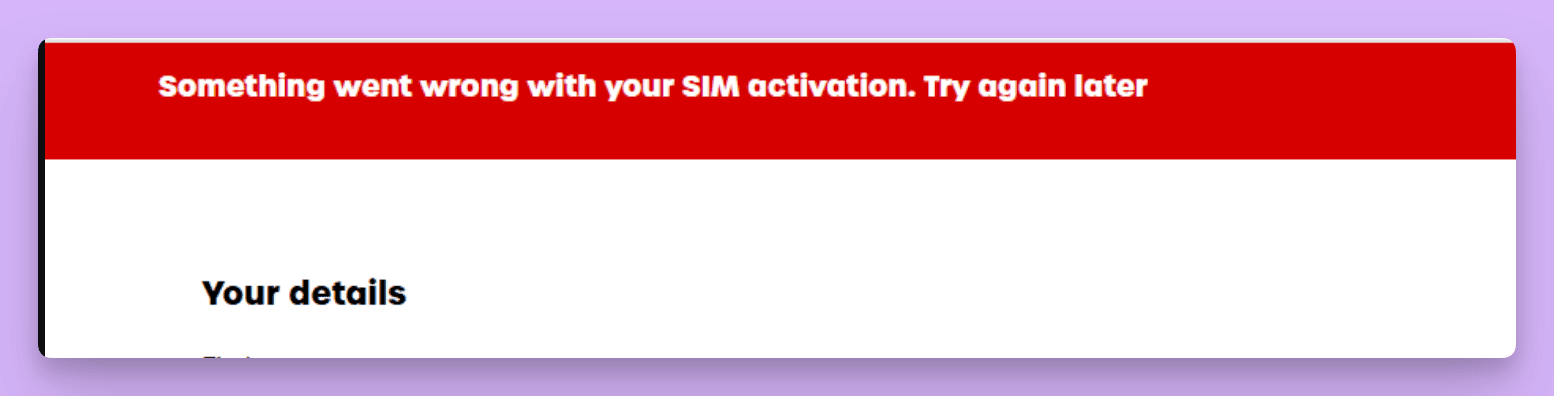
Location 1: After clicking Pay now on checkout
Card details and CVV are entered, but the gateway fails during processing. Funds are rarely deducted at this point.
Cardholders do not need to worry about unauthorized charges.
Location 2: After clicking Continue on 'Your details'
Users enter billing details, and clicking Continue throws the error before the payment method selection screen appears.
Because payment has not occurred, users often mistakenly suspect network issues or defective cards.
Identical Troubleshooting for Both Stages
giffgaff does not disclose granular reasons for this generic message.
Regardless of stage, switching to an official voucher is significantly more effective than rotating network proxies.
Real Case Study: UK VPN and Incognito Mode Both Failed
In late October 2026, LarkSIM support handled a real consultation, summarized below with private identifiers removed.
Customer Experience
A user attempted to activate a physical SIM with an international Visa card. The error triggered on the 'Your details' screen before payment.
The user tested two standard internet workarounds:
- check_circleSwitching network exit nodes to a UK IP address.
- check_circleOpening a clean incognito browser window.
Both attempts reproduced the identical error.
Three Typical Customer Questions
- check_circleHow does voucher activation work? Does selecting 'I have a voucher' bypass card entry?
- check_circleWhat voucher denomination is needed? Is £10 sufficient?
- check_circleIf the error occurs before payment, will a voucher genuinely fix it?
These questions represent standard concerns. Below are the direct answers.
Question 1: Redeeming Vouchers in Activation
giffgaff natively supports vouchers. Select 'Or redeem a top-up voucher' on the checkout screen and enter the 16-digit code without entering card details.
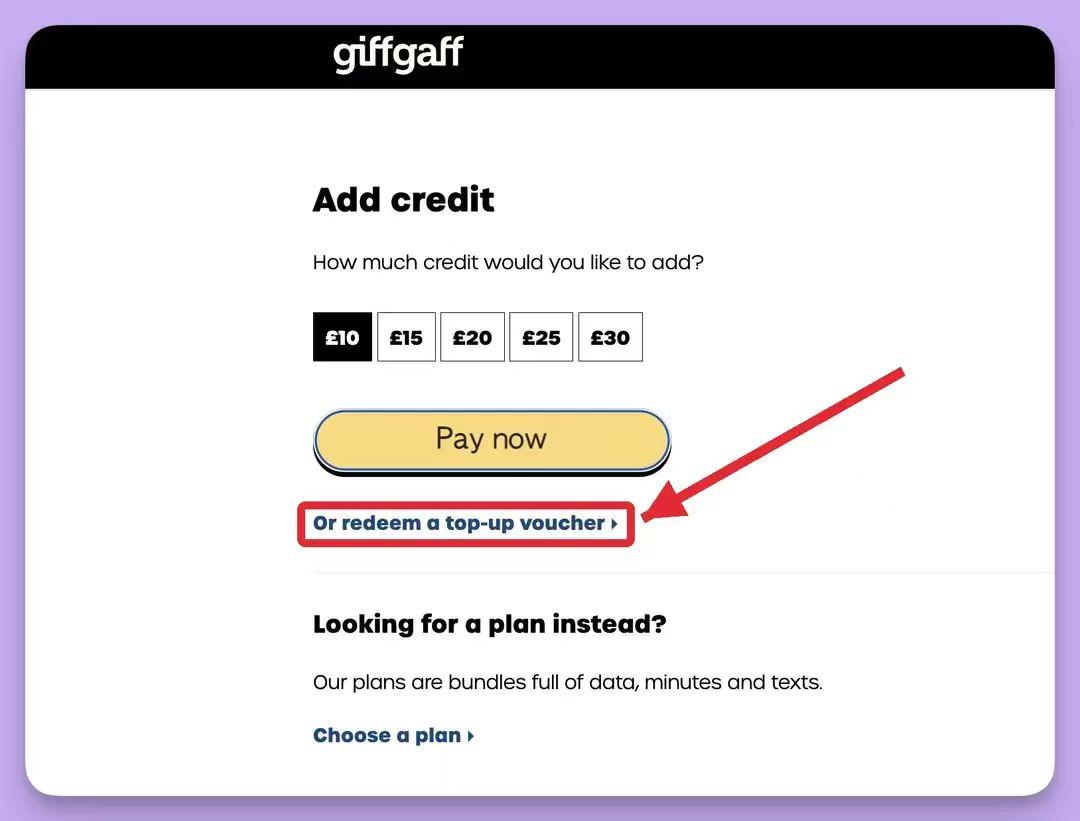
Question 2: Denomination Sufficiency
giffgaff's minimum top-up tier is £10. A standard £10 voucher fully covers activation without requiring higher face values.
A valid £10 voucher satisfies the entire activation requirement.
Question 3: Vouchers Resolving Pre-Payment Blocks
Most users encountering pre-payment errors succeed upon switching to vouchers, as vouchers bypass banking authorization completely.
We advise avoiding repeated proxy rotations and testing an official voucher directly.
Underlying Mechanics Behind International Card Rejections
While giffgaff accepts Visa, Mastercard, Amex, PayPal, and vouchers, supporting a payment scheme does not guarantee individual transaction clearance.
When experiencing giffgaff payment didn't go through, cross-border checkouts fail due to multiple validation layers.
Common friction points include:
3D Secure Verification
Overseas merchants enforce 3DS challenges. Failure of OTP windows to load or delayed SMS delivery causes gateway timeouts.
Issuer Fraud Filters
Small international telecom transactions on cards without overseas spend history trigger conservative bank fraud filters.
Billing Address Verification
UK acquiring gateways cross-reference address formats with card issuer records, causing pre-payment rejections.
Card Security Settings
Mobile banking apps frequently disable overseas online payments by default.
Irrelevance of VPNs
Payment screening occurs between gateways and issuing banks; changing VPN nodes does not resolve card verification issues.
A 5-Step Systematic Troubleshooting Checklist
Follow these progressive verification steps before retrying payment:
- check_circleInspect Mobile Banking: Check for temporary pre-authorization holds or decline alerts. If a hold exists, do not retry immediately.
- check_circleVerify Overseas Toggles: Ensure overseas online transactions are enabled and single-transaction limits exceed £10.
- check_circleMatch Billing Details: Enter your authentic registered address in Romanized Pinyin; do not supply fictitious UK addresses.
- check_circleRetry Exactly Once: After verifying settings, make one additional attempt. If it fails, stop immediately to avoid card flags.
- check_circleSwitch to Official Vouchers: Redeem a 16-digit voucher code to bypass credit card processing entirely.
The first four steps isolate root causes. If you prefer avoiding trial and error, proceed directly to Step 5.
Why Official Vouchers Are the Preferred Solution
For users residing abroad with domestic cards, official vouchers eliminate checkout friction:
First, vouchers require zero banking scheme authorization, completely bypassing 3DS and fraud filters.
Second, these are genuine giffgaff £10 vouchers, functioning identically to in-store UK vouchers for immediate SMS reception.
Third, automated digital delivery provides codes instantly on the order confirmation screen and via email.
For customers who have not yet purchased a card, the [giffgaff starter pack](https://larksim.com/en/checkout?product=giffgaff-starter-pack) bundles a physical SIM with a £10 voucher and setup support.
Users with existing international payment methods can choose the [giffgaff blank self-setup SIM](https://larksim.com/en/checkout?product=giffgaff-blank-sim).
Voucher Activation: Complete Step-by-Step Workflow
Standard physical SIM activation workflow with a voucher:
- check_circleLocate the 6-character activation code printed on the physical SIM packaging.
- check_circleVisit giffgaff.com/activate and register or log in to your giffgaff account.
- check_circleFill in 'Your details' in Romanized Pinyin and proceed.
- check_circleSelect pure Pay As You Go credit (£10).
- check_circleClick 'Or redeem a top-up voucher' instead of entering card details.
- check_circleInput the 16-digit voucher code and confirm redemption.
- check_circleConfirm that your dashboard reflects £10 credit and displays your new UK mobile number.
- check_circleInsert the SIM into your phone and test call or SMS reception.
If the Error Appears on 'Your Details'
Check address fields and retry in an incognito window, selecting voucher payment. If the barrier persists, take a screenshot and contact giffgaff support noting you intend to activate via voucher.
eSIM Voucher Constraints
First-time eSIM provisioning mandates purchasing an active plan with a bank card. Vouchers cannot directly initiate a new eSIM profile. Physical SIMs remain the most reliable path.
Total Activation and Maintenance Cost Breakdown
| Item | Cost | Details |
|---|---|---|
| Physical SIM Card | ¥99 (Blank) or ¥299 (Starter Pack) | LarkSIM pricing; starter pack includes £10 official voucher and setup assistance |
| Initial Top-Up | Minimum £10 | Official giffgaff minimum top-up threshold |
| Standalone Voucher | ¥159 / voucher | Instant 16-digit digital code delivering £10 pure credit |
| Number Retention | One billable action every 180 days | Sending one SMS while roaming costs 30p (approx. ¥2.7) |
A £10 balance sustains a UK number for multiple years when used solely for receiving free verification SMS.
Three Critical Post-Activation Configurations
1. Turn Off Cellular Data Roaming
Roaming data outside the UK is billed at 20p/MB. Turn off Cellular Data and Data Roaming on your giffgaff SIM to prevent balance drainage.
2. Disable Auto-Renew
Ensure recurring plans and auto top-up are disabled in account payment settings.
3. Note Inactivity Deadlines
Under giffgaff policy, completing a billable action (such as sending one SMS costing 30p) once every 180 days maintains active number status.
Keep in mind that long-term roaming accounts are subject to periodic fair-use reviews; keep balance moderate for peace of mind.
Common Edge Cases and Solutions
Voucher Flagged as Invalid
Verify 16-digit code entry carefully. If purchased via LarkSIM, check your order confirmation or contact support with a screenshot.
Error Persists with Voucher
Capture the error screenshot and timestamp, and contact giffgaff support stating you are activating via official voucher.
Access Denied
This indicates network-level IP blocking; disconnect proxy tools and connect over standard domestic broadband.
Card Charged but No Credit
Check whether the charge was an automated pre-authorization hold. Unsettled holds drop off automatically within several days.
Balance Depleted Rapidly
Almost always caused by background mobile data roaming. Ensure data roaming remains disabled.
Three Scenarios: How to Choose
Already Have a Card with Checkout Errors
Purchase a standalone [£10 giffgaff official top-up voucher](https://larksim.com/en/checkout?product=giffgaff-topup-10).
Need a Card and Have Only Domestic Payment Methods
Choose the [giffgaff starter pack](https://larksim.com/en/checkout?product=giffgaff-starter-pack).
Have Working International Cards or PayPal
Select the [giffgaff blank self-setup SIM](https://larksim.com/en/checkout?product=giffgaff-blank-sim).
Summary and Next Steps
'Something went wrong with your SIM activation. Try again later' is a generic error that surfaces either after clicking Pay now or on the 'Your details' screen. Rotating IP addresses rarely helps.
Run through the 5-step checklist, and if issues persist, switch to an official 16-digit voucher to bypass card processing.
If you already have a card, pick up a [£10 giffgaff official top-up voucher](https://larksim.com/en/checkout?product=giffgaff-topup-10). If starting fresh, select the [giffgaff starter pack](https://larksim.com/en/checkout?product=giffgaff-starter-pack).
Frequently Asked Questions
Is the physical SIM card defective?expand_more
Does giffgaff still accept international Visa cards?expand_more
What voucher denomination is needed for activation?expand_more
Will connecting through a UK VPN resolve the error?expand_more
Can eSIMs be activated using vouchers?expand_more
官方来源 / Official sources
Real UK +44 number · Ships from China · Chinese setup guides
giffgaff UK physical SIM
Register and manage a real UK mobile number yourself, shipped from local stock in China. The self-service SIM suits people who already have a way to top up; the worry-free SIM includes an official £10 top-up voucher.