How to Request a giffgaff Refund After an Account Is Disabled
In this case, a giffgaff account was disabled and both the plan and credit changed to `Not available` on the Dashboard. The account previously held £10 of purchased airtime credit. After an agent request, the card statement showed a ¥90.84 refund against the original £10 transaction. This is evidence of one successful refund, not a guarantee for every disabled account. Eligibility still depends on why the service was stopped, where the credit came from and whether a deadline applies. This successful giffgaff refund is one case, not a guarantee for every disabled account.
On this page
Identify the account state first
| Account state | First action | Refund boundary |
|---|---|---|
| Dashboard shows `Not available` and service has stopped | Ask an agent to review the account and remaining credit | Disabled accounts are assessed individually |
| The SIM was deactivated after prolonged inactivity | Contact an agent within 30 days | Current help says remaining credit can be requested during this window, except where deactivation followed non-permitted use |
A signal or roaming fault is not enough to establish that the account has been disabled. Check the Dashboard and ask an agent to confirm the status before requesting closure.
Protect the number before closing anything
If the UK number is still tied to banking, email or another important service, say that you need to keep it and ask whether a PAC can be issued before closure. Current giffgaff help gives an inactive deactivation a 30-day PAC and credit-refund window. A security or account-review restriction still needs a case-specific answer from an agent.
Collect the evidence
Prepare the mobile number, member name, a screenshot of `Not available`, the approximate restriction date, recent top-up or bank records, the remembered credit balance and a valid original payment method. Do not send a full payment method, password or one-time code in the ticket.
Contact a giffgaff agent
Open the giffgaff agent form, sign in to the affected account and choose the closest account or payment category.
Keep subsequent replies in the same ticket. The request should establish the account status, refundable amount, destination payment method and the order of any PAC and closure steps.
Follow the agent's payment instructions
The agent may ask for account evidence or a valid payment method to be added again. Current terms say card refunds require a saved valid debit or payment method. PayPal refunds for cancelled orders return to the PayPal account used for payment.
After giffgaff processes an approved refund, its help page says banks normally need another three to five business days. Weekends, payment method methods and currency conversion can change the date and local-currency amount.
Evidence from the £10 refund
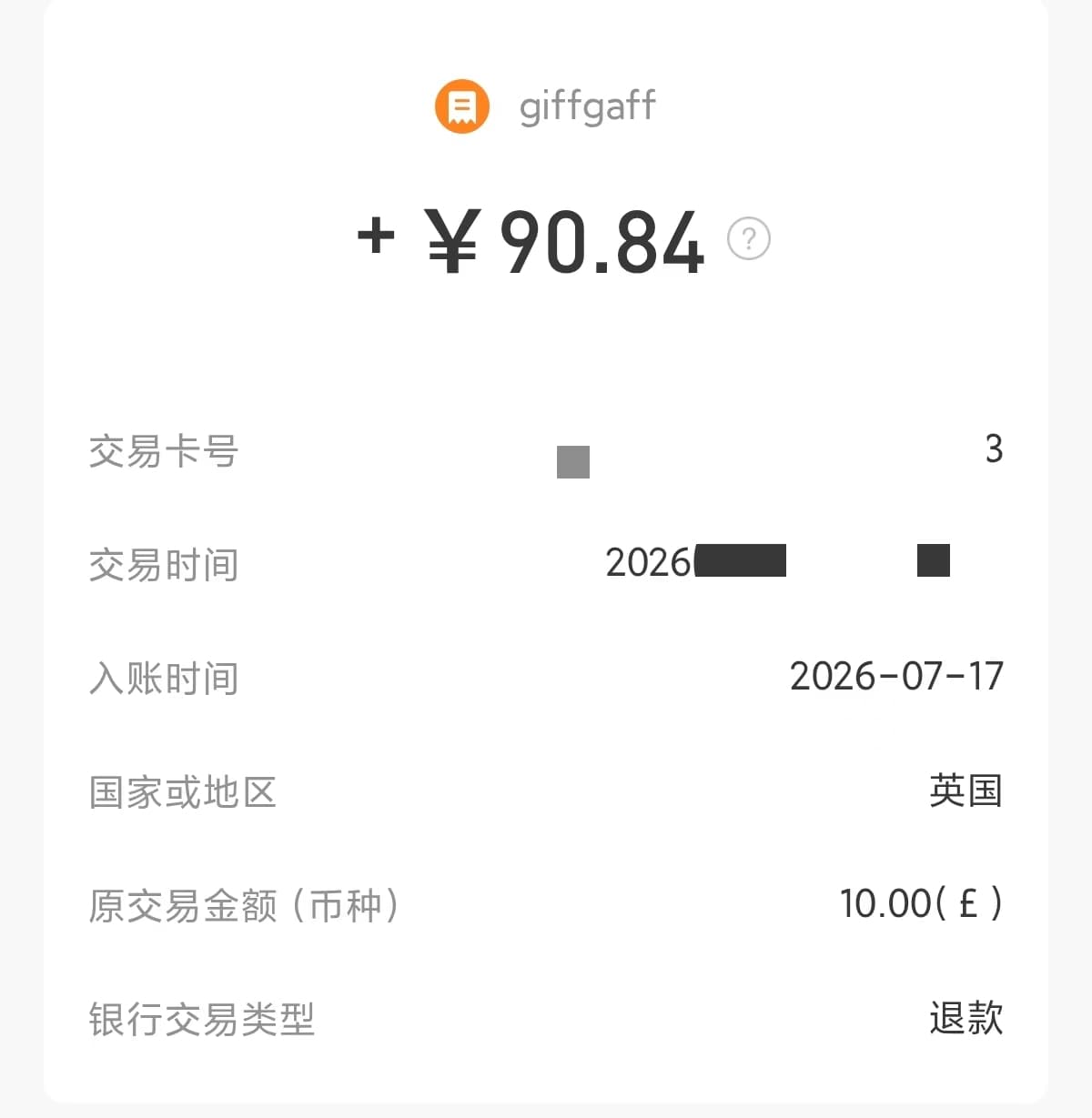
The screenshot shows `+¥90.84`, an original transaction amount of `10.00 £` and the transaction type marked as a refund. The transaction identifier and exact time are redacted. A different card or exchange rate will produce a different local-currency amount.
If the request is refused
Ask for the specific reason in writing. The result can change when more than 30 days have passed after inactivity deactivation, the account was stopped for non-permitted use, the balance was promotional rather than purchased, the SIM was lost or stolen, or the request concerns an already used plan.
Reply once with the relevant evidence and ask which rule applies. If the written answer still appears inconsistent with the account records, use the official complaint route and include the original ticket reference.
Completion check
| Goal | Next action | Finished result |
|---|---|---|
| Refund remaining credit | Submit one agent ticket with payment evidence | The agent confirms the amount and the original payment method receives it |
| Keep the number and request a refund | Ask about the PAC before closure | The number transfer completes, then the refund arrives |
| Challenge a refusal | Ask for the account status and rule in writing | The agent identifies missing evidence or gives a final reason |
| Resolve a temporary Dashboard fault | Ask whether the account is actually disabled | The account returns and the plan and credit display again |
A submitted ticket is not the end of the process. Finish when the written refund amount and destination match a credit on the original card or PayPal account.
官方来源 / Official sources
- What to do if a giffgaff account is disabled · giffgaff
- Number deactivation and the refund window · giffgaff
- giffgaff refund help · giffgaff
- Getting a PAC or STAC · giffgaff
- giffgaff terms and refund rules · giffgaff
- Protecting a giffgaff account · giffgaff
- Roaming troubleshooting abroad · giffgaff
- How to make a complaint · giffgaff
Real UK +44 number · Ships from China · Chinese setup guides
giffgaff UK physical SIM
Register and manage a real UK mobile number yourself, shipped from local stock in China. The self-service SIM suits people who already have a way to top up; the worry-free SIM includes an official £10 top-up voucher.