How to Stop giffgaff Auto Renewal and Cancel a Monthly Plan
To stop giffgaff auto renewal on a monthly rolling plan, switch Auto-renew off under My plan in the app, then save on the following screen. Your current plan stays active until it expires. You can also use the website steps below. If your account has an 18-month contract or a rolling contract after that term, use the contract cancellation route instead.
On this page
- 1. Check which type of plan you have
- 2. How to stop giffgaff auto renewal in the app
- 3. How to cancel a giffgaff monthly rolling plan online
- 4. Check auto top-up and credit payments separately
- 5. How to cancel a giffgaff rolling contract or fixed-term contract
- 6. Decide what happens to your number
- 7. Use PAC or STAC when moving to another network
- 8. Confirm that the right action has finished
- 9. Questions about cancelling giffgaff renewal
- 10. Related guides
Checked against giffgaff help on 20 September 2026. Screenshots show official examples, not a cancellation performed on a customer account. Their plan prices and dates are illustrative.
Check which type of plan you have
| Account type | Cancellation route |
|---|---|
| Monthly rolling plan or ordinary renewing plan | Turn off Auto-renew. The current monthly plan, including its extra data, lasts until expiry. |
| Mobile contract within its 18-month term | Use contract termination and review any early exit charge. |
| Rolling contract plan after an 18-month term | Open Contract details, then Terminate your contract and End my contract. |
A monthly rolling plan and a rolling contract after a fixed term have different exit routes. Check the account label before cancelling.
How to stop giffgaff auto renewal in the app
- 1
Find your plan
Open the app home screen and locate Auto-renew, sometimes called Recur, beneath My plan. - 2
Switch it off and save
Set the switch to OFF and save on the next screen. Return to the plan to check that the saved setting is off.
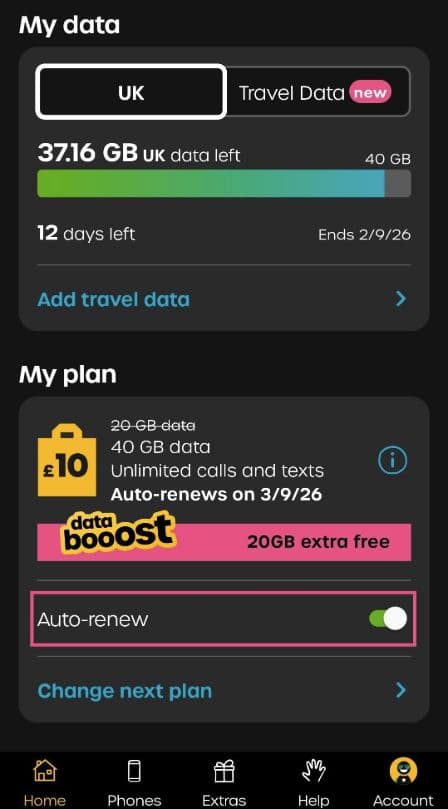
An active plan can still appear after cancellation. Note its expiry date; its remaining allowance has not been cancelled.
How to cancel a giffgaff monthly rolling plan online
- 1
Open account payments
Sign in and open + Account, then Orders and payments. - 2
Edit the next plan
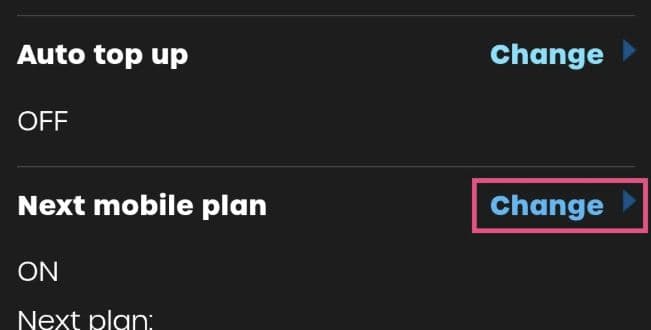
Choose Change beside Next mobile plan. Some dashboards also offer Change recurring plan. - 3
Turn off renewal
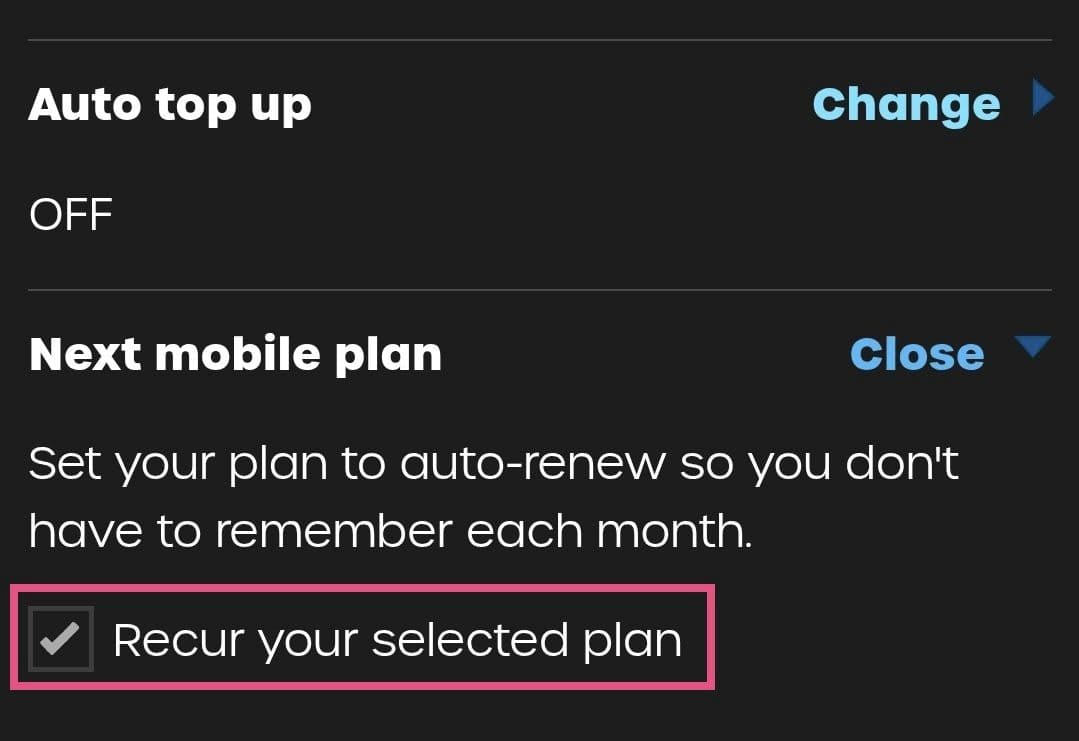
Set Auto renew to OFF, or untick Recur your selected plan, then choose Save settings.
Check auto top-up and credit payments separately
Auto top-up adds credit when your balance is low. If you also want to stop these charges, switch Auto top up OFF in My payments or on the app home screen.
Use my credit first chooses the payment source for renewal. Turning that option off can leave renewal charging a saved payment method. To stop the next plan purchase, check the plan’s Auto-renew setting itself.
How to cancel a giffgaff rolling contract or fixed-term contract
For an 18-month contract, use Orders & payments → Terminate your contract → End my contract online. The documented app route is Account → Payment methods → Leaving giffgaff → Close my account. Read the end date and any charge before confirming.
An early termination charge is half the current or most recent monthly plan price multiplied by the full months remaining. After the 18-month term, use End my contract in your contract details to close the continuing rolling contract.
If you activated your SIM within the last 14 days and want to cancel registration and request a refund, contact a giffgaff agent. Remaining credit and unused plan value have separate refund rules. A plan purchased with a phone order requires cancellation of the complete phone order to qualify for that plan refund.
Decide what happens to your number
If you want to stop buying monthly plans but retain the number, it still needs qualifying activity at least once every six months. Eligible calls, texts, mobile data use or a credit purchase can count. Follow the number retention guide for the conditions.
Before giving up a number, update important accounts that still use it. Stopping renewal does not immediately erase membership records; the number and retained account information are separate.
Use PAC or STAC when moving to another network
Choose a PAC to move your existing number, or a STAC to switch without keeping it. Give the code to the new provider within its 30-day validity. Requesting it alone does not start a transfer. See the PAC transfer guide if you need to keep the number.
Confirm that the right action has finished
| Action | Completion check | If it has not worked |
|---|---|---|
| Stop a monthly plan renewing | Reopen the saved setting. Auto-renew or Recur is off and you know the current expiry date. | Contact an agent if renewal is still scheduled or settings will not save. |
| Stop automatic credit top-ups | Auto top up is also off. | Identify whether a charge bought a plan or added credit, then provide its date and amount to support. |
| End a contract or switch network | You have termination confirmation or the new network confirms the completed switch. | A submitted request alone is not completion. Check the provider’s response. |
If you only wanted to stop the next ordinary monthly plan, you can stop once renewal is saved as off. There is no need to close the account or request a STAC. Act before the payment or change deadline shown in your account. A charge already made needs a separate enquiry; turning off renewal does not automatically refund it.
Questions about cancelling giffgaff renewal
Can I cancel giffgaff monthly rolling at any time?expand_more
Can I still use my data after turning off auto-renew?expand_more
Does deleting the giffgaff app cancel my plan?expand_more
Does stopping auto-renew cancel my number?expand_more
Real UK +44 number · Ships from China · Chinese setup guides
giffgaff UK physical SIM
Register and manage a real UK mobile number yourself, shipped from local stock in China. The self-service SIM suits people who already have a way to top up; the worry-free SIM includes an official £10 top-up voucher.