giffgaff activation page shows Access Denied? What to do when the page errors after redeeming a voucher (2026)
You reach the first top-up while activating giffgaff, redeem a voucher or pay, and the page turns into a block of code saying AccessDenied / Access Denied instead of moving on.
On this page
This means the giffgaff website refused that one request. It does not mean your SIM is faulty or your voucher is void. Check whether the SIM is already active, then switch network and reopen the activation page in a private window; in most cases you can carry on from there.
This article comes from a real reader report: following the giffgaff activation guide, they redeemed a £10 official top-up voucher at the first top-up and the page below appeared, with giffgaff.com/activate still in the address bar.
The steps follow the giffgaff Help articles "I can't activate my SIM" and "Activating your giffgaff SIM" as of 20 October 2026.
giffgaff has not published the exact cause of this error, so the causes below are common scenarios; always follow what the page actually tells you.
What this page means
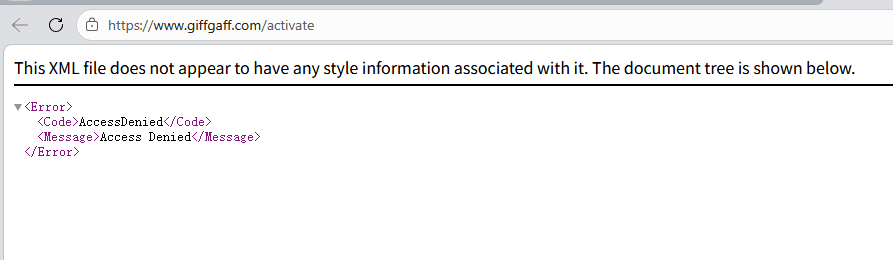
This is the website's server refusing the request. The browser did not get a normal page, so it shows the raw response. It tells you this one request was blocked; it says nothing wrong about your SIM, account or voucher.
Common scenarios:
| Possible cause | Typical situation | What to do |
|---|---|---|
| Network route blocked | You use a proxy or VPN and its IP is blocked by the site's security rules | Switch to another server or another network |
| Session expired | The activation page was left open for a long time before you continued | Close it and reopen the activation page |
| Refresh, back or double submit | The page was loading during payment and you refreshed or went back | Do not refresh; start again from the activation page |
| Old data in the browser cache | You opened giffgaff pages in the same browser before | Use a private window, or clear cache and cookies |
Do not top up again yet: check whether the SIM is already active
The error can appear after the redemption has already gone through, with the page simply failing to move on.
Redeeming again would then tell you the voucher has been used, which only adds confusion. Check first:
- check_circlePut the giffgaff SIM in your phone, wait a few minutes and look for a text from giffgaff. giffgaff says it sends you your number once the SIM is up and running.
- check_circleCheck the email address you registered for a message from giffgaff.
- check_circlegiffgaff Help says activation is usually quick but can take up to 24 hours. If there is no service yet, restart the phone later and check again.
Not active: get back in with these 4 steps
- 1
Switch network first
Change your proxy server, ideally to a UK or US one rather than Hong Kong, or switch network, for example to a phone hotspot. - 2
Open a private browser window
A private window carries no old cache or cookies. giffgaff Help also suggests clearing cookies and cache, or trying another browser or device, when activation fails. - 3
Reopen the activation page
In the private window, open giffgaff.com/activate and follow the prompts. giffgaff says new members should not be logged in to any existing giffgaff account when activating a new SIM, otherwise it may become a SIM swap on that account. - 4
Finish the first top-up
On the plan page choose Pay as you go, then tap Or redeem a top-up voucher and enter the 16-digit voucher code. Do not refresh or go back; wait for the page to move on by itself.
For the full flow with screenshots, see the giffgaff activation guide.
Voucher says it has been used but there is no credit
Usually the first redemption succeeded and the error page hid the result. Check activation as above first, and do not keep entering the same code.
- check_circleTake a screenshot of the message and note the voucher code and your order number.
- check_circleIf you bought the voucher from LarkSIM, reply to your order email or contact LarkSIM support and we will check the voucher status.
- check_circleIf the voucher was redeemed but no credit shows in the account, contact giffgaff support.
giffgaff support links
If none of the above works, go to giffgaff directly:
- check_circleHelp centre: help.giffgaff.com. Search common questions; once logged in you can contact an agent (Ask an agent).
- check_circleCommunity: community.giffgaff.com. You can read without logging in, and many long-time members answer activation questions.
How to avoid it next time
- check_circleHave everything ready before you start: the activation code on the back of the card, an email address you use, and the voucher code or an overseas bank card.
- check_circleUse a stable connection and a private window, and finish in one go without long pauses.
- check_circleIf the page is loading during payment or redemption, wait. Do not refresh, go back or click again.
- check_circleWithout an overseas bank card, use a voucher for the first top-up. Visa cards from Chinese banks often fail; choose the giffgaff worry-free SIM with a £10 official voucher included, or buy a £10 official top-up voucher on its own.
FAQ
Does Access Denied mean my SIM is faulty?expand_more
Can I still use my voucher after the error?expand_more
Still Access Denied after switching server?expand_more
How long does activation take?expand_more
Real UK +44 number · Ships from China · Chinese setup guides
giffgaff UK physical SIM
Register and manage a real UK mobile number yourself, shipped from local stock in China. The self-service SIM suits people who already have a way to top up; the worry-free SIM includes an official £10 top-up voucher.