giffgaff SIM Activation, eSIM QR Codes and Top-Up Guide (2026)
Use this guide to activate a UK giffgaff physical SIM, choose a plan or credit and troubleshoot setup. If you searched for a giffgaff eSIM QR code, the direct answer is that giffgaff currently provides no QR code, SM-DP+ address or manual code: installation must be completed in the latest giffgaff app.
View physical giffgaff SIMsarrow_forwardOn this page
- 1. What you need before activating
- 2. Activation steps
- 3. Plans vs credit: which should you use?
- 4. How to top up and renew
- 5. eSIM activation and preparing from mainland China
- 6. How to keep your UK number long-term
- 7. Troubleshooting common activation issues
- 8. Frequently asked questions
- 9. Official sources
- 10. Related guides
What you need before activating
Before you start, make sure you have the following to hand:
- check_circleYour UK giffgaff physical SIM card — find the 6-character activation code on the back of the SIM holder (letters and numbers, e.g. 5PKJ46).
- check_circleAn unlocked device with internet access (phone or computer) to open the activation page.
- check_circleAn email address you use regularly, to register your giffgaff account.
- check_circleA payment method or top-up voucher, to buy a plan or add credit (activation itself is free).
Activation steps
- 1
Find the 6-character activation code on the SIM holder
After your order arrives, take out the physical SIM and locate the 6-character code on the back of its holder. Do not insert the SIM while activating it; insert it only after the online activation is complete.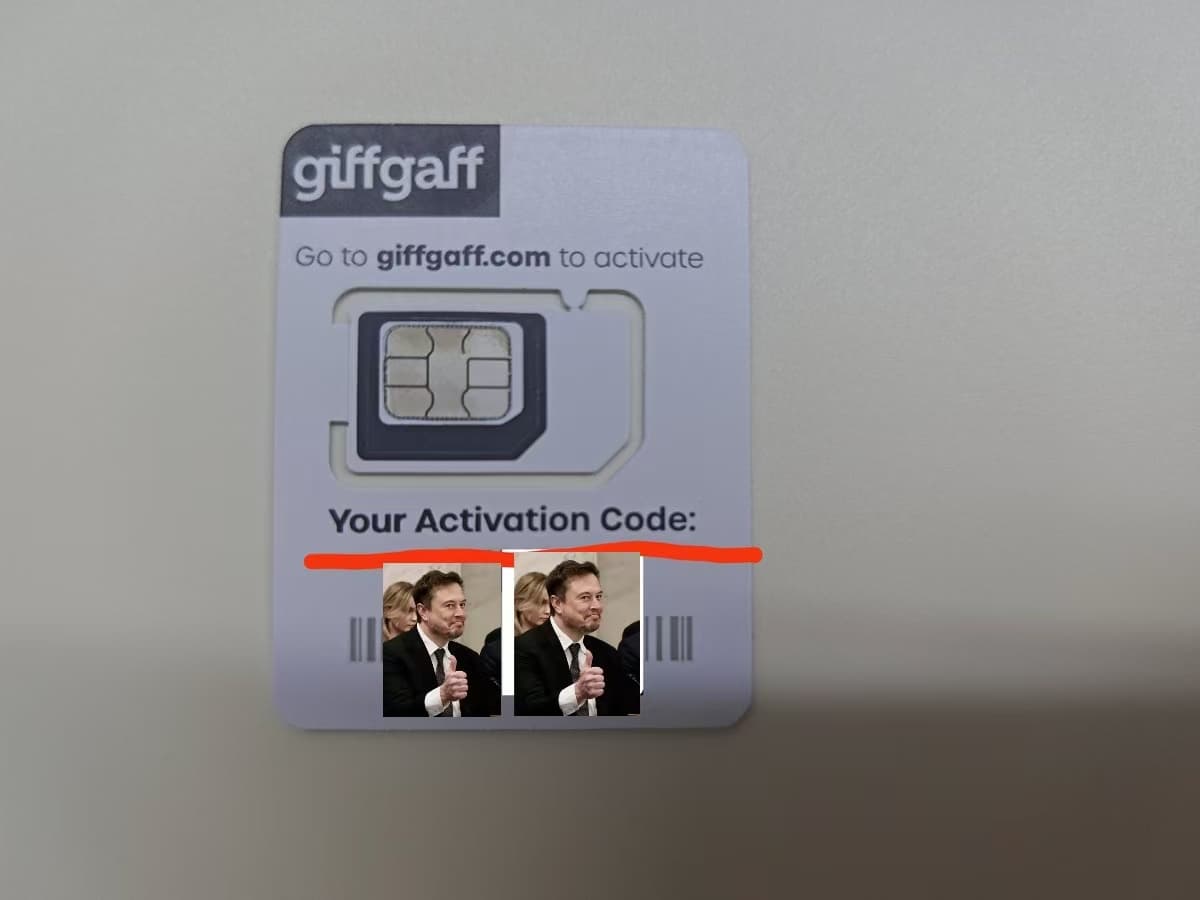
The 6-character Activation Code is printed on the back of the SIM holder. The code is covered in this photo; use the code on your own card. - 2
Open the official giffgaff activation page
In a browser, go to giffgaff.com/activate. - 3
Enter your activation code
Type in the 6-character code from the SIM packaging (e.g. 5PKJ46). If you've lost the packaging, use the SIM serial number printed on the back of the card instead. - 4
Create a giffgaff account
Enter your email address and set a password to create your giffgaff online account. - 5
Choose a plan or add credit
Select a monthly plan, or add some credit to your account to get started. Pay in one of two ways:Option 1: pay by card
Choose an amount, tap Pay now, then enter your real card number, name on card, expiry date and security code.Option 2: redeem an official top-up voucher
Tap Or redeem a top-up voucher below the Pay now button. On the next page, fill in your name and address, enter your 16-digit top-up voucher code, tick I understand and agree, then tap Activate my SIM. - 6
Wait for your SIM to connect
Connection usually comes through within a few minutes; in rare cases it can take up to 24 hours. After inserting the card, wait 10–20 minutes for the SIM to register on the network, then test calls and data.
Finally, insert the SIM and check it works. Once your top-up is complete, put the SIM into your phone and give it a few minutes. A foreign SIM needs a little time to find and register on a local network the first time.
When giffgaff sends you a welcome text, "Welcome to giffgaff... Your new giffgaff number is 07xxx", you're all set.
The number starting with 07 is your UK mobile number. We recommend taking a screenshot of it.
Plans vs credit: which should you use?
giffgaff has two billing options. Understanding the difference makes it easy to know which to buy:
- check_circlePlan (formerly 'goodybag'): a 30-day bundle with a set allowance of calls, texts and data. Usable in the UK and across multiple European countries (roaming is subject to fair-use limits). Best for regular everyday use.
- check_circleCredit: pay-as-you-go balance — calls, texts and data are deducted as you use them. Good for very light usage or as a top-up fallback.
You can use one or both: once a plan's allowance runs out, charges come from your credit balance at standard rates. Certain items — MMS, service numbers, special-rate calls — also draw from credit even while on a plan. For most users, the best approach is to buy a plan and keep a small credit balance as a safety net.
How to top up and renew
Log in to your giffgaff account to buy a new plan or add credit — you can use a payment method or a top-up voucher. You can set a plan to auto-renew so you never lose connectivity. Because giffgaff is contract-free and runs on 30-day rolling plans, you can switch to a bigger or smaller plan at any time.
eSIM activation and preparing from mainland China
A giffgaff eSIM is not activated by scanning a QR code on the website. Use the latest giffgaff app on an eSIM-capable, network-unlocked phone and keep a reliable connection, ideally Wi-Fi, while the profile downloads. giffgaff does not provide QR codes, SM-DP+ addresses or manual activation codes.
From mainland China, you can check device compatibility, install the app and prepare stable internet and account details. Do not assume that UK network service can always be completed before arrival: follow the live status in the giffgaff app and official pages.
For device checks, in-app setup for new members, physical-SIM replacement and troubleshooting, see our giffgaff eSIM setup guide.
How to keep your UK number long-term
If you want to hold on to your UK number after returning home — for example, to keep receiving notifications from UK banks or institutions — there is just one rule to remember:
Troubleshooting common activation issues
- check_circleNo signal after inserting the SIM: confirm your phone is unlocked and the card is seated correctly. Restart the phone and wait 10–20 minutes for the network to register.
- check_circleActivation code not accepted: double-check you've entered it correctly. If the packaging is lost, use the SIM serial number printed on the back of the card.
- check_circleStill not activated after a while: giffgaff states activation can take up to 24 hours. Try moving to a location with better signal, or log in to your account to check activation status.
- check_circleCan't access mobile data: ensure mobile data and data roaming are switched on in your phone settings. APN settings are usually configured automatically.
Frequently asked questions
How long does activation take?expand_more
What if I can't find my activation code?expand_more
What's the difference between a plan and credit?expand_more
Is activation free?expand_more
Can I activate a giffgaff eSIM with a QR code?expand_more
Will my number be recycled if I don't use it?expand_more
官方来源 / Official sources
- Activate your giffgaff SIM · giffgaff
- Activating your giffgaff SIM · giffgaff Help
- Getting started on giffgaff · giffgaff Help
- Switching to an eSIM with giffgaff · giffgaff Help
Don't have a SIM yet? Get your UK giffgaff card
In stock in China and shipped to your door. Self-Setup requires your own top-up method; Full-Service includes an official £10 voucher, so the included voucher covers the first top-up. Customers complete setup themselves.
arrow_forwardView UK giffgaff SIM card