OpenAI Codex Phone Verification: Using a giffgaff UK SIM Card from China (2026)
On this page
- 1. When OpenAI Triggers Phone Verification for Codex
- 2. Why +86, Hong Kong Numbers, VoIP and Disposable SMS Sites Fail
- 3. Three Typical Developer Setups
- 4. Five Steps to Verify Codex with Your giffgaff SIM
- 5. Five Common Issues and How to Troubleshoot Them
- 6. Next Step and When to Stop
- 7. FAQ
- 8. Official sources
- 9. Related guides
Your ChatGPT account works fine in a browser, then you open Codex in the ChatGPT desktop app or generate your first OpenAI API key and hit a mandatory phone verification screen. Mainland China (+86) numbers are not accepted, and Google Voice gets rejected straight away.
We re-checked OpenAI's phone verification help pages (updated 24 November 2026), giffgaff's official China roaming rates, and giffgaff's deactivation policy on 25 November 2026. The block comes down to supported regions and number type, and disposable SMS sites create a lock-out risk that shows up months later.
If you need a real carrier-backed overseas SIM that you own and keep long term, LarkSIM stocks the giffgaff Full-Service SIM or the giffgaff Self-Setup SIM. Both give you a physical UK +44 mobile number registered under your own account.
All OpenAI policies, giffgaff roaming tariffs and LarkSIM prices below were verified on 25 November 2026.
When OpenAI Triggers Phone Verification for Codex
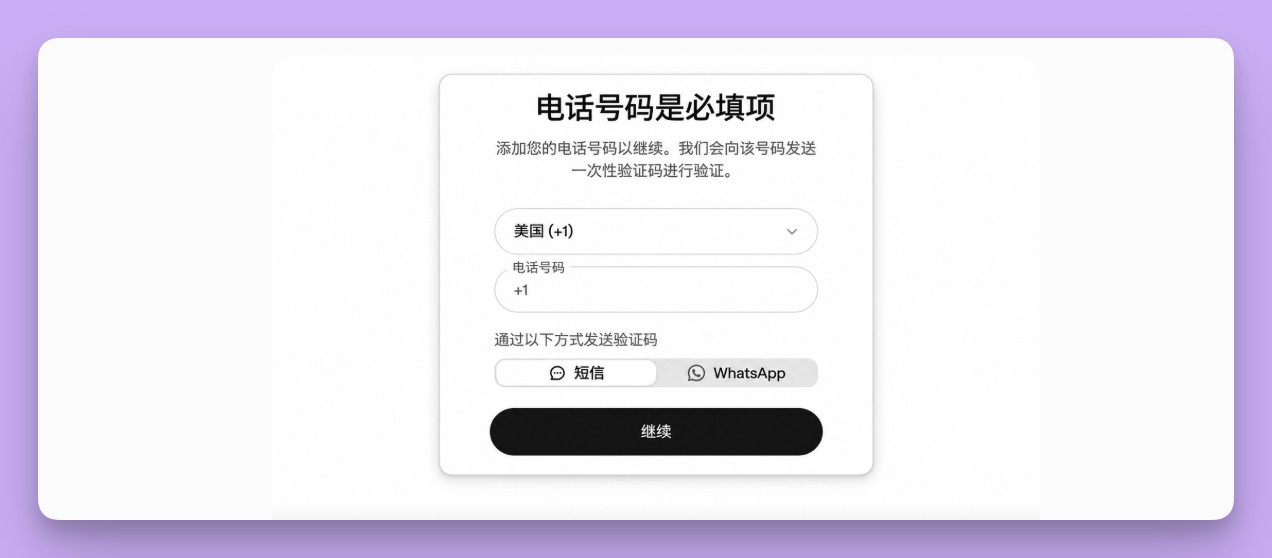
OpenAI's phone verification guide separates ordinary web chat from developer workflows. Creating a standard OpenAI account or chatting on the web generally does not require a phone check. Two actions still trigger it: opening Codex in the ChatGPT desktop app, and creating your initial API key on platform.openai.com (later API keys do not normally repeat the prompt).
The country selector defaults to the United States. Codes arrive only by SMS or, in 12 listed countries such as India, Indonesia, Malaysia, Turkey, the UAE and Vietnam, by WhatsApp. OpenAI states directly that email verification and authenticator apps cannot replace this phone check, and voice calls are not offered.
The United Kingdom is not on the 12-country WhatsApp list, so a UK +44 giffgaff SIM receives standard SMS codes without setting up WhatsApp.
Why +86, Hong Kong Numbers, VoIP and Disposable SMS Sites Fail
Mainland China and Hong Kong numbers
On OpenAI's supported countries and territories list, the United Kingdom and the United States are included, while China, Hong Kong and Macau are absent. A Hong Kong SIM works well for many regional apps, yet it does not match OpenAI's supported-country list. OpenAI also warns that accessing services from unsupported regions can trigger region errors or suspension, so a valid SIM only satisfies the phone check and does not replace compliant network access.
Google Voice and VoIP lines
OpenAI blocks landlines, VoIP numbers, Google Voice and premium-rate numbers because of automated abuse. Most cheap virtual lines fail right at submission.
One-time SMS rental sites
Two official OpenAI rules make rented one-time numbers risky for paid accounts. First, OpenAI's phone number usage limit caps each mobile number at 3 OpenAI accounts, and shared pools hit that cap fast. Second, OpenAI's changing your phone number policy confirms there is no option to change or update the phone number linked to either a ChatGPT or OpenAI API account.
If you verify a Plus or Pro coding account with a throwaway rental number and later get asked for a second SMS check on a new laptop, you have no way to receive the code and no self-service way to swap the number.
Three Typical Developer Setups
Paid Plus or Pro subscribers running Codex daily
When monthly subscriptions and coding history sit inside one OpenAI account, losing access to the verified phone number hurts far more than buying a physical SIM. Choosing the giffgaff Full-Service SIM puts a UK carrier number in your own phone and email account, with free incoming verification texts and simple 4-to-5-month upkeep.
Engineers creating their first OpenAI API key
Generating the first key on platform.openai.com mandates phone verification, while later keys generally skip it. Remember OpenAI's 3-account ceiling per phone number: keep track of which accounts use your giffgaff SIM so test accounts do not eat up all three slots.
Developers comparing UK and US lines
If you use a China-market phone and want plain cellular roaming without configuring US Wi-Fi Calling, a giffgaff SIM works right out of the slot. If you also need a +1 US number for Grok or US-specific services, compare our US ENC T-Mobile SIM verification guide before ordering.
Five Steps to Verify Codex with Your giffgaff SIM
- 1
Activate the SIM with PAYG credit
If you plan to keep the number long term at low cost, top up £10 as credit rather than a recurring monthly UK plan. See choosing credit vs a plan at activation and the giffgaff activation guide. Most numbers assign within minutes, though some activations take up to 24 hours. - 2
Disable mobile data and data roaming for the giffgaff line
Once activation succeeds and your UK number shows on the dashboard, insert the SIM and first switch off data roaming and automatic data switching for that SIM in your cellular settings. SMS works over the cellular signal and does not depend on mobile data. See giffgaff China roaming charges. - 3
Test ordinary incoming SMS first
Wait for the SIM to register on China Mobile or China Unicom, then send a regular text from another phone to your +44 number. Confirm that normal texts arrive before touching the OpenAI verification page. - 4
Enter the UK number without the leading zero
On the Codex or API verification page, switch the country code from United States to United Kingdom (+44). Drop the leading 0 from your UK mobile number, entering 7xxx xxxxxx instead of 07xxx xxxxxx. Double-check our UK +44 number format guide, click send once, and wait one to two minutes. - 5
Finish verification and schedule retention reminders
Enter the code, confirm Codex opens or your first API key is created, and add a recurring 4-to-5-month calendar alert to send one chargeable text so the line never hits the 6-month deactivation cut-off.
Five Common Issues and How to Troubleshoot Them
Signal bars show, yet neither normal texts nor codes arrive
Confirm that 24 hours have passed since activation. Toggle airplane mode for 10 seconds, or turn off automatic carrier selection and manually switch between China Unicom and China Mobile. On dual-SIM phones, confirm the giffgaff line is enabled. Step-by-step checks are in our giffgaff China SMS troubleshooting guide.
Normal texts work, but OpenAI says the number is invalid or asks for another
Check that +44 is selected and the leading 0 is removed. Do not hammer the resend button, because repeated clicks trigger rate limits; OpenAI's help article specifically tells users to respect any waiting period shown in the error message. If the screen asks for a different number, try another eligible mobile number you control while staying signed into the same account, or screenshot the exact error for OpenAI Support.
Maximum account limit reached
Each number works on at most 3 OpenAI accounts. Only after a non-banned consumer ChatGPT account is fully deleted and 30 days pass does OpenAI clear the number from its system.
Region unavailable error despite a UK number
A UK mobile line satisfies OpenAI's number rules, not its regional access rules. Make sure your connection originates from a supported country, clear cookies and cache, or retry in a private browser window.
Forgotten upkeep or long-term outside-UK disconnection risk
giffgaff emails warnings 1 month and roughly 5 days before a 6-month inactivity deactivation. After deactivation the SIM cannot be turned back on, and you only have 30 days to request a PAC or credit refund before the number is recycled. In late July 2026, giffgaff also disconnected a batch of PAYG lines used long-term outside the UK. Keep an eye on your giffgaff email and never tie every recovery channel of critical accounts to a single phone number. Read more in our long-term giffgaff use in China guide.
Next Step and When to Stop
If this is your first UK SIM card, pick the option that fits what you already have: order the giffgaff Full-Service SIM (¥299) if you lack an overseas card or want support guidance; pick the giffgaff Self-Setup SIM (¥119) if you already have a working overseas card and prefer DIY setup; or grab a £10 official top-up voucher (¥159) if you already hold an active giffgaff SIM that needs credit for upkeep texts.
You are done once your phone receives the OpenAI SMS code, Codex opens or your initial API key is generated, and your 4-to-5-month retention reminder is saved. If normal texts arrive fine while OpenAI repeatedly rejects the number or flags an unsupported region, stop clicking resend and avoid testing throwaway SMS sites. Wait out any cooldown, fix your network region, or contact OpenAI Support with the exact error text.
FAQ
Can I use a Hong Kong (+852) SIM card for OpenAI Codex verification?expand_more
Does OpenAI send Codex verification codes to UK giffgaff numbers by SMS or WhatsApp?expand_more
How many OpenAI accounts can one giffgaff number verify?expand_more
Can I pass Codex verification with a disposable number now and switch to giffgaff later?expand_more
How do I stop my giffgaff UK number from being deactivated while living in China?expand_more
Should a first-time buyer choose the Self-Setup SIM or the Full-Service SIM?expand_more
官方来源 / Official sources
- LarkSIM giffgaff Full-Service SIM · LarkSIM
- LarkSIM giffgaff Self-Setup SIM · LarkSIM
- giffgaff China Roaming Charges · giffgaff
- giffgaff Help: Why Your Number Has Been Deactivated · giffgaff
Check current LarkSIM availability
Review the current supply, activation boundary and support scope before ordering a physical SIM.
arrow_forwardView the giffgaff physical SIM