Ultra Mobile PayGo Top Up Guide: Adding Money to the Wallet, Auto Renew and Assisted Top-Ups
On this page
- 1. What exactly are you topping up?
- 2. Which top-up methods does Ultra Mobile offer?
- 3. Topping up in the Ultra Mobile app
- 4. How do you top up on the Ultra Mobile website?
- 5. Your own top-up failed: getting help from support
- 6. How much should you add at a time?
- 7. Purple SIM top-up FAQ
- 8. Official sources
Many people buy the Ultra Mobile PayGo US purple SIM to keep a US phone number long term while living in mainland China, and use it to receive verification texts from overseas websites, banks and social platforms.
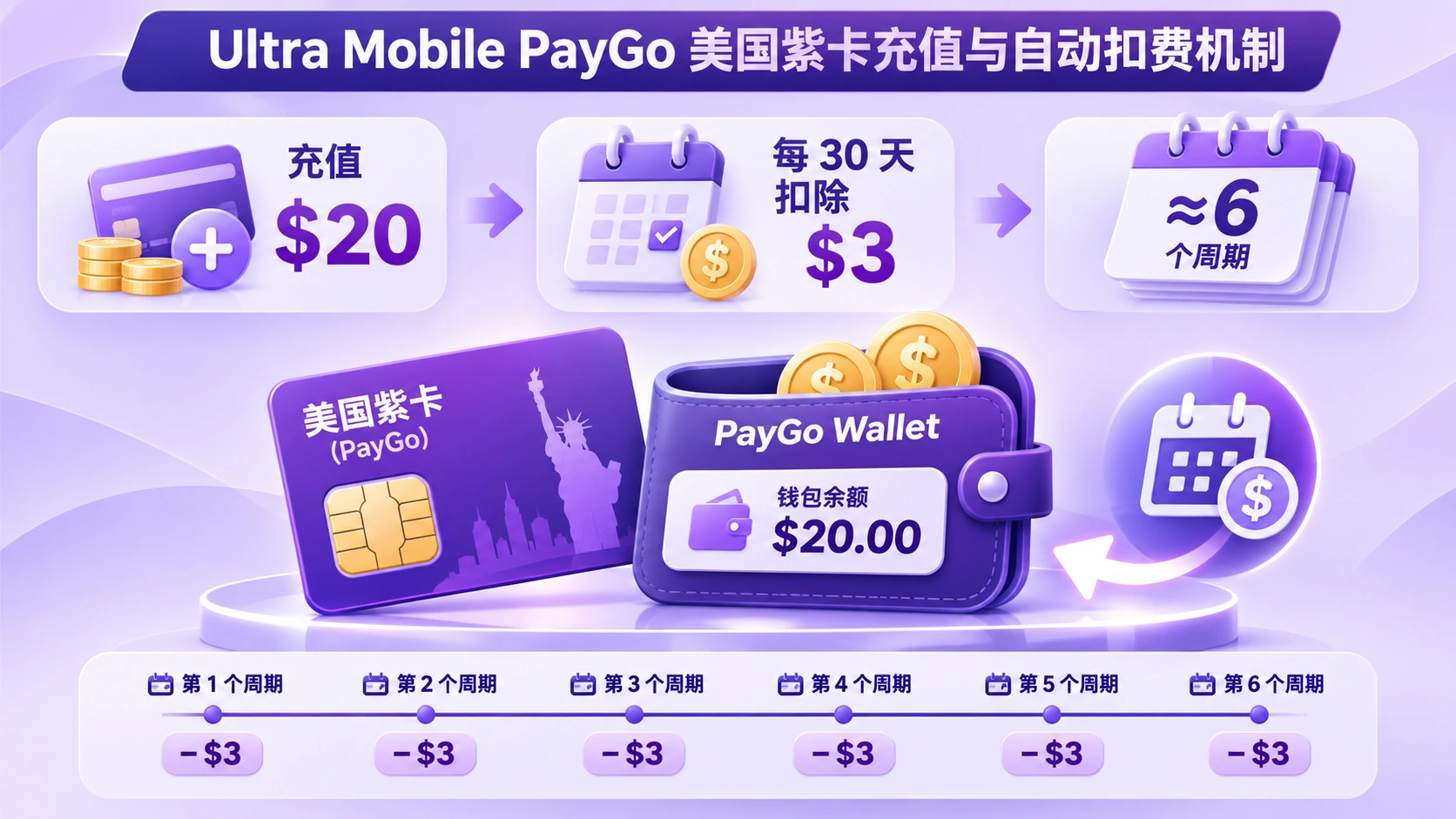
The base plan costs only $3 every 30 days, so keeping the number is cheap. Unlike a Chinese SIM, though, the purple SIM is charged from a PayGo Wallet balance. You top up the wallet in advance and the system takes the renewal fee automatically when the plan is due.
So how do you do an Ultra Mobile PayGo top up? Can a Chinese bank card pay? Do you need Auto Renew? And what if you have no suitable payment method?
This guide covers the ways to top up, the steps and how much to add if you want to keep the number long term.
What exactly are you topping up?
Before you top up, it helps to understand two terms: PayGo Wallet (your balance) and Plan Renewal.
Think of the PayGo Wallet as a piggy bank for your phone bill. Money you add goes into the wallet, and at the end of each plan cycle the system takes the $3 base plan fee from it.
For example, if your wallet is empty and you add $20 in one go, with no other spending each renewal takes $3, so $20 covers 6 full renewal cycles with $2 left over.
So the purple SIM does not require you to top up by hand every 30 days. It only needs money in the wallet for the line to keep working.
Which top-up methods does Ultra Mobile offer?
Under Ultra Mobile's published PayGo top-up rules, you can add money through the official website, the official app, bank cards, Auto Renew, PayGo-specific refill cards, authorised retailers and official customer care.
For people using the purple SIM long term in mainland China, these are the practical options.
| Top-up method | Best for |
|---|---|
| Ultra Mobile app | People with a suitable bank card who want to manage the number themselves |
| Ultra Mobile website | People who would rather not install the app |
| Auto Renew | Long-term number keepers who do not want to top up by hand |
| PayGo refill card | People who can buy a genuine refill card |
| Ultra Mobile customer care | People whose own top-up failed or who have payment questions |
| LarkSIM assisted top-up | People with no suitable payment method or top-up channel |
If you have a bank card that works for overseas payments, try the official app or website first. If you really cannot find a way to pay, you can also contact LarkSIM support for help.
Topping up in the Ultra Mobile app
Topping up in the official Ultra Mobile app is convenient and self-service, and the app also shows your wallet balance, renewal date, payment history and Auto Renew status.
Ultra Mobile account login: https://my.ultramobile.com/
After you log in, these are the main items to watch on the account home page.
| Label | Meaning |
|---|---|
| Plan Renewal Date | Date of the next plan renewal |
| Renewal Cost | Plan renewal fee |
| PayGo Wallet | Current wallet balance |
| Voice | Remaining call minutes |
| SMS | Remaining texts |
| Data | Remaining data |
PayGo Wallet and Plan Renewal Date matter most if you are keeping the number long term: one tells you how much money is left, the other when the next renewal happens.
Step 1: Open the PayGo Wallet top-up page
On the home page, find PayGo Wallet and tap the + next to the balance, or go in through Make a Payment. On the Manage PayGo Wallet page you can see your current balance and the amounts you can add.
The usual amounts are:
- check_circleAdd $5.00: adds $5;
- check_circleAdd $10.00: adds $10;
- check_circleAdd $20.00: adds $20.
Pick an amount and tap its button to reach the order confirmation page. If you only want to keep the US number long term without topping up often, consider adding $20 at once.
Step 2: Add a bank card
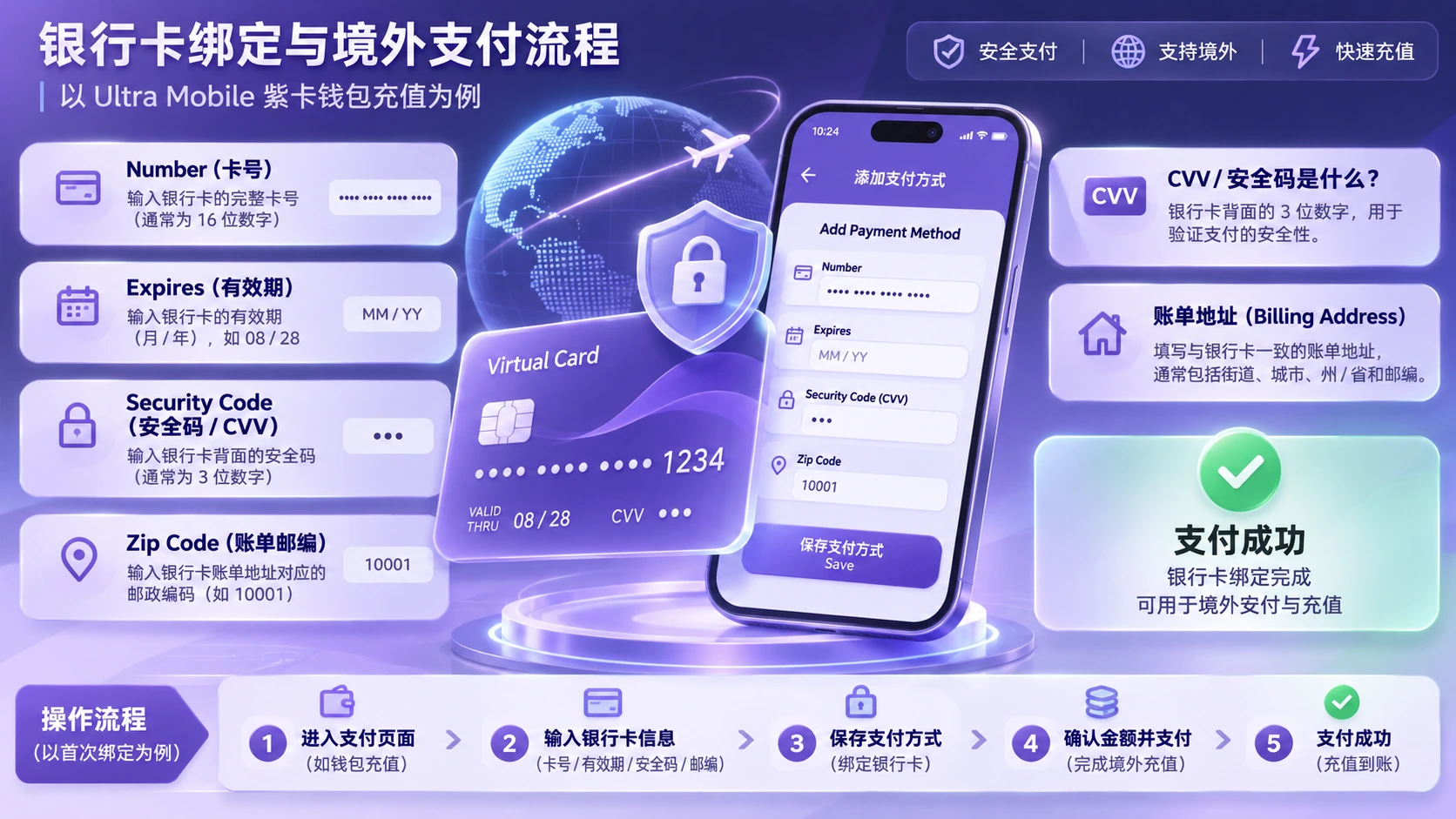
On the order confirmation page, if you have not saved a card before, tap Add Payment Method to add one.
Ultra Mobile officially accepts credit and debit cards for PayGo wallet top-ups. In China, try a Visa or Mastercard that has overseas online payments switched on.
Note that not every Visa or Mastercard issued in China will go through. If the billing ZIP check fails, the bank declines or the payment fails, ask your card issuer or try another suitable card.
Enter the billing address and ZIP code exactly as your bank holds them. Do not make up details.
If several cards all fail, you can also contact LarkSIM support for help topping up.
Step 3: Confirm the amount and pay
Once the card is saved, go back to the Confirm and Purchase page and check the top-up amount, taxes and the final amount due.
For example, a $5 top-up might show the following.
| Item | Amount ($) |
|---|---|
| PayGo Wallet (top-up) | 5 |
| Taxes & Surcharges | 0.23 |
| Total Due | 5.23 |
This order cost $5.23 in total: $5 went into the wallet and $0.23 was taxes and surcharges.
These figures are only an example. The actual taxes and total are whatever the top-up page shows.
When everything looks right, tap Purchase Now to pay.
Step 4: Check that the money arrived
After paying, go back to the app home page, check that the PayGo Wallet balance has gone up and look at the payment history.
For example, with $2 in the wallet and a $20 top-up, and no other spending, the balance should be $22 afterwards.
If the top-up happens to land on a renewal date, the system may take $3 straight away, so the balance shown can be different.
Do not rely on your bank's charge text alone. Check the actual balance and transaction history in your Ultra Mobile account.
How do you top up on the Ultra Mobile website?
If you would rather not install the Ultra Mobile app, you can top up on the official website instead.
Account login: https://my.ultramobile.com/
The steps are:
- check_circleOpen the Ultra Mobile account login page.
- check_circleLog in with your purple SIM number and account password.
- check_circleFind PayGo Wallet or the top-up entry in your account.
- check_circleChoose the amount to add.
- check_circleAdd a bank card or pick a saved one.
- check_circleCheck the top-up amount and the total charged, then pay.
- check_circleGo back to the home page and check that the balance has arrived.
Your own top-up failed: getting help from support
For users in China, the usual problem is not the steps themselves but having no suitable way to pay.
No card that works for overseas payments, a Chinese credit card that keeps failing, a billing ZIP that will not verify: in any of these cases you can contact Ultra Mobile customer care, or contact LarkSIM support for help topping up.
Top up through Ultra Mobile customer care
Ultra Mobile's PayGo FAQ lists contacting Customer Care as one of the supported ways to top up.
Official contact details:
- check_circleWebsite: https://www.ultramobile.com/
- check_circlePhone: +1 888-777-0446
- check_circleLive chat: find the Chat entry on the official website.
- check_circleHours: daily, 6:00 to 18:00 US Pacific Time.
If you are not sure how to ask in English, you can use the message below.
Message template for customer care:
Hello, I have an Ultra Mobile PayGo plan. I am currently outside the United States and would like to add $20 to my PayGo Wallet. However, I am unable to complete the payment online. Could you please help me recharge my account or provide an alternative payment method? Thank you.
Top up with help from LarkSIM support
If you have no card that works for overseas payments, have tried several ways without success or simply cannot find a way to top up, LarkSIM can help you top up your SIM.
Whether your Chinese card was declined, the English screens are hard to follow or you cannot find the official top-up entry, you can contact LarkSIM support about an assisted top-up.
When you contact us, just give us two things:
- check_circleSIM brand: for example Ultra Mobile PayGo (US purple SIM)
- check_circlePhone number: the full number to top up, ideally with the country code
Support will confirm the amount you can add and the cost based on your SIM brand and needs.
After you agree the plan and pay, log in to the carrier's official app or website and check your wallet balance to confirm the top-up arrived.
LarkSIM assisted top-up steps:
- check_circleOpen the LarkSIM website.
- check_circleContact live chat and say you need a SIM top-up.
- check_circleGive the SIM brand and phone number.
- check_circleConfirm the top-up amount and the cost.
- check_circlePay and wait for support to process it.
- check_circleLog in to the carrier account and check the top-up.
LarkSIM website: https://larksim.com/
How much should you add at a time?
The base plan costs $3 every 30 days. If you mainly want to keep the number, choose an amount that suits your habits.
Assuming no other spending, this is how long different wallet balances last.
| Wallet balance ($) | Full renewal cycles | Time covered | Left after renewals ($) |
|---|---|---|---|
| 5 | 1 | 30 days | 2 |
| 10 | 3 | 90 days | 1 |
| 20 | 6 | 180 days | 2 |
| 30 | 10 | 300 days | 0 |
| 36 | 12 | 360 days | 0 |
| 40 | 13 | 390 days | 1 |
| 50 | 16 | 480 days | 2 |
The amounts are wallet balances, not all of them are single top-up options. Time covered is the future plan cycles the balance can pay for and does not include what is left of the cycle you have already paid.
Short-term use: add $5 to $10
If you have just started with the purple SIM and are not sure you will keep it, add $5 or $10 first and top up again when the balance runs low.
Keeping the number long term: add $20
For most people who mainly use the purple SIM for verification texts, adding $20 at once is the easy choice. With no other spending it pays for the next 6 plan cycles, so you do not have to top up every 30 days.
Topping up less often: keep $40 to $50 in the wallet
If your purple SIM is linked to important overseas accounts and you want to top up less often, consider keeping the wallet at $40 to $50 and checking the account regularly.
Remember that a plan cycle is 30 days, not a calendar month. $36 covers only 12 full cycles, or 360 days, which is not quite a full year.
International roaming calls and texts can also eat into the wallet, so keep a little extra rather than topping up exactly the base plan fee.
Purple SIM top-up FAQ
Can I top up the purple SIM with Alipay or WeChat Pay?
Ultra Mobile's PayGo FAQ lists credit and debit cards as the online payment methods. Alipay and WeChat Pay are not supported.
If you have no suitable card and want to pay in RMB, contact LarkSIM support about assisted top-ups and the payment methods available.
Can I top up the purple SIM with PayPal?
PayPal is supported, but the PayGo FAQ mainly names credit and debit cards.
Can I top up with a refill card?
Yes, but you need a PayGo-specific refill card, not a standard Ultra Mobile plan refill card.
Is $3 taken as soon as the top-up goes through?
Not necessarily. If your current plan is still active, the money usually goes into the wallet first, and the base plan fee is taken on the next renewal date.
My purple SIM is already suspended. Can I still top up?
If it was suspended only because the balance ran short and the account has not been cancelled, topping up the balance can restore service.
Ultra Mobile says that if the wallet holds less than $3 at renewal, the account is suspended. Within the suspension holding period you can restore the plan by topping up.
However, the 60-day cancellation deadline is described differently in different places, so do not wait until the deadline is close. Once you notice the suspension, top up as soon as possible and check the account status.
How do I check my purple SIM wallet balance?
There are three ways to check:
- check_circleLog in to the Ultra Mobile app and look at PayGo Wallet.
- check_circleLog in to your account on the Ultra Mobile website and check the balance.
- check_circleText BAL to 6700 from the purple SIM to get your balance and plan details.
In mainland China, whether the short-code text works depends on your network and service status. If it does not, check on the website or in the app.
Can I just top up the wallet without buying a data pass?
Yes. If you mainly want to keep a US number long term and receive verification texts, you do not need a data pass to keep the number.
As long as the account is in good standing and the wallet can pay the base plan fee each cycle, it renews normally.
The purple SIM does not include international roaming data. In mainland China, roaming call and text charges are whatever the carrier publishes.
I did not buy my purple SIM from LarkSIM. Can I still ask about top-ups?
If you bought your purple SIM elsewhere and are now having trouble topping up, you can still contact LarkSIM support.
Just give us the SIM brand and phone number. Support will confirm whether we can top it up and agree the plan and cost with you.
官方来源 / Official sources
- LarkSIM Ultra Mobile PayGo eSIM · LarkSIM