giffgaff Verification Text Won't Send? A Troubleshooting Guide for Using It in China
giffgaff is active and has signal, but the verification text won't send? Five checks in order, from activation time to the +86 format, plus a support message template.
On this page
- 1. Background: giffgaff is activated, so why can't it send texts?
- 2. 1. Activated less than 24 hours ago
- 3. 2. Confirm giffgaff is active and has usable credit
- 4. 3. Activated over 24 hours ago: check the recipient number format first
- 5. 4. Select a network manually and reconnect to roaming
- 6. 5. The text says sent, but the Chinese number never receives it
- 7. 6. Ordinary texts send, but a platform's verification text won't
- 8. 7. Nothing worked: how to contact giffgaff support
- 9. 8. Summary: check in this order to find the cause faster
giffgaff SIM is activated and the phone recognises it, so why does sending a verification text still fail?
Many people buy a giffgaff UK SIM to keep a UK number in mainland China for signing up to overseas platforms, linking accounts or verifying a phone number. In practice, the account is topped up and the phone shows signal, yet after tapping send you see "Not Delivered" or "Message failed to send".
The short answer: if giffgaff won't send a verification text, first check whether 24 hours have passed since activation. If they have, check the recipient number's international format, the roaming network, the SMS sending line and your credit balance in turn, then test with a Chinese number on a different carrier.
Background: giffgaff is activated, so why can't it send texts?
First, a successful activation doesn't mean every service on the SIM is already working.
In mainland China in particular, giffgaff works through a local carrier's network on roaming. Even if the account shows Active and has plenty of credit, the phone may still be unable to send SMS because of a network registration problem or the wrong sending line.
The common causes are:
- check_circleThe account isn't fully active yet: activation has only just finished, the UK number hasn't been assigned properly, or the phone hasn't registered on a roaming network.
- check_circleNo usable credit: the account has a plan but too little credit to pay for roaming texts in mainland China.
- check_circleSending from the wrong number: with a Chinese SIM and giffgaff both installed, the text actually goes out from the Chinese number.
- check_circleWrong sending method: the phone uses iMessage or RCS instead of ordinary carrier SMS.
- check_circleNetwork problems: giffgaff hasn't registered on a local carrier, or the SMS centre settings are wrong.
- check_circlePlatform limits: ordinary texts send fine, but the platform's short code or service number doesn't accept texts in this roaming situation.
Below we go through the checks in order, from easiest to check and fix.
1. Activated less than 24 hours ago
If you've only just submitted activation and 24 hours haven't passed, the SIM may not be fully active yet.
giffgaff activation usually takes a few minutes to a few tens of minutes, but sometimes it can take up to 24 hours. A web page saying your activation request was submitted doesn't mean every service works on the phone straight away.
giffgaff's own help centre says some activations can take 24 hours, and suggests restarting the phone's network connection when you have connection problems.
Try these steps:
- check_circleOpen Settings and turn on Airplane Mode. Wait about 10 seconds, then turn it off.
- check_circleWait for the phone to search for and connect to a local carrier's network.
- check_circleIf it doesn't recover, try once or twice more, or restart the phone.
Sign in to the giffgaff website and check that a UK number starting with +44 has been assigned and that the SIM shows as active.
If 24 hours haven't passed, wait for activation to complete. Don't top up again or request a replacement SIM just because texts fail for now.
If more than 24 hours have passed and the account still isn't active, or the phone never connects to a roaming network, work through the steps below and contact giffgaff support.
2. Confirm giffgaff is active and has usable credit
Open the giffgaff website or the giffgaff app, sign in, and on the account home page check your UK number and your credit balance.
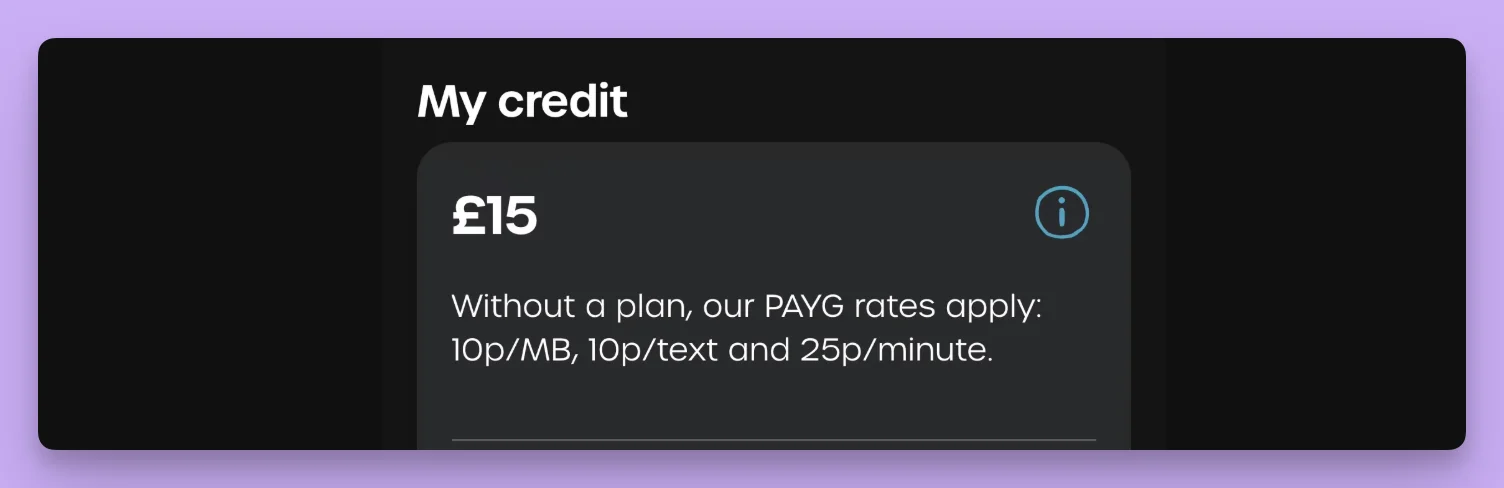
A plan allowance and ordinary credit are not the same thing. When you send an ordinary text in mainland China, plan texts usually can't be used and the roaming charge comes out of My credit. Make sure there is enough usable credit for one text; you can check the balance on your giffgaff account page.
3. Activated over 24 hours ago: check the recipient number format first
This is the step many people overlook when sending texts from giffgaff in mainland China: the number format.
When a giffgaff UK SIM is roaming in mainland China and texts a mainland Chinese number, use the international format.
For a mainland Chinese mobile number, the standard format is +86 followed by the 11-digit number.
For example, to text 13812345678, enter +8613812345678.
The + means international format, 86 is mainland China's country code, and the 11 digits after it are the actual number.
The 0086 international dialling prefix sometimes works too, but to reduce differences in how phones and networks read the number, +86 is the better first choice.
Note that writing just 86 plus the number doesn't mean the text will definitely fail. Some phones and carriers still read it correctly, but using +86 rules out the recipient format as the cause.
How to set the recipient number on an iPhone
Use ordinary SMS, not iMessage or RCS.
Open the built-in Messages app, tap New Message in the top right, and type the full +86 number in the To field.
Confirm the sending line is giffgaff, send one ordinary SMS and see whether the phone reports it as sent.
If the phone has both a Chinese SIM and giffgaff installed, make sure the text goes out from the giffgaff number, not the Chinese SIM.
Test texts may incur international roaming charges, so send just one at a time to avoid unnecessary costs.
4. Select a network manually and reconnect to roaming
If the number format is right and the account has credit but giffgaff still says sending failed, try selecting a network manually.
giffgaff uses its partner network in the UK and roaming networks in mainland China. If the phone hasn't completed network registration or the current connection is faulty, ordinary texts may not send.
giffgaff also recommends a manual roam when texts won't send or arrive, or the network misbehaves.
iPhone steps
- check_circleOpen Settings, go to Mobile Service (Cellular), choose the giffgaff line, tap Network Selection and turn off Automatic.
- check_circleWait for the phone to search for nearby networks.
- check_circleIf China Mobile or China Unicom appears in the list, select it manually and see whether it registers.
- check_circleOnce connected, try sending one ordinary SMS.
Note that seeing a carrier in the list doesn't mean giffgaff can register on it. Whether it works depends on local coverage and giffgaff's roaming partners.
If China Mobile won't connect, try China Unicom. If manual selection never succeeds, turn Automatic back on so the phone searches for a usable roaming network again.
Android steps
On Android, the setting is usually under Settings → Mobile network → SIM management → Carrier, where you'll find the automatic carrier selection switch.
Turn off automatic selection, wait for the phone to search, and try connecting to China Mobile or China Unicom. Setting names differ between Android brands, so follow what your phone shows.
After switching networks, send another ordinary text to test. If it still fails, restart the phone and check that giffgaff has normal signal.
5. The text says sent, but the Chinese number never receives it
If giffgaff shows no error but the mainland Chinese number never receives the text, the giffgaff SIM itself isn't necessarily the problem.
Chinese carriers may apply spam detection, blocking or security filtering to some texts from abroad. So even if giffgaff has submitted the text, the recipient may not receive it because of carrier filtering.
For example, if you text a China Mobile number from giffgaff, the sending side shows no failure but nothing ever arrives, you can't conclude that giffgaff's outgoing SMS is broken, nor that China Mobile definitely blocked it.
First check the Chinese phone's spam and blocked message records. If it's not there, test with a China Unicom or China Telecom number.
Keep using the same giffgaff SIM and send the same short text, changing only the recipient number.
If the Unicom or Telecom number receives it while the China Mobile number never does, giffgaff can at least text some mainland Chinese numbers. You can then ask the original recipient's carrier to check for international SMS blocking or delivery problems.
If numbers on different carriers all fail to receive it, keep the sending record, times and error messages and report them to giffgaff support.
6. Ordinary texts send, but a platform's verification text won't
If the steps above show that giffgaff can text mainland Chinese numbers but sending a verification text to an overseas platform fails, look more closely at that platform's verification requirements.
For example, some platforms ask you to send a text with specific content from your linked UK number to a designated number to verify your account.
First check that the number linked to the platform is right, that the text matches exactly what the platform asked for, and that the recipient number is typed correctly.
Some overseas short codes may not accept texts sent while roaming. Even if giffgaff can send ordinary SMS to mainland Chinese numbers, it can't necessarily text every overseas platform's special number.
Don't conclude the giffgaff SIM is faulty just because one platform's verification fails.
7. Nothing worked: how to contact giffgaff support
If more than 24 hours have passed, the SIM still can't send texts, and you've checked the number format, roaming network and credit and tested different Chinese numbers, contact giffgaff support and ask them to check your account status and SMS service.
Help centre: https://help.giffgaff.com/en
Open the giffgaff help centre and find the chat window in the bottom right of the page.
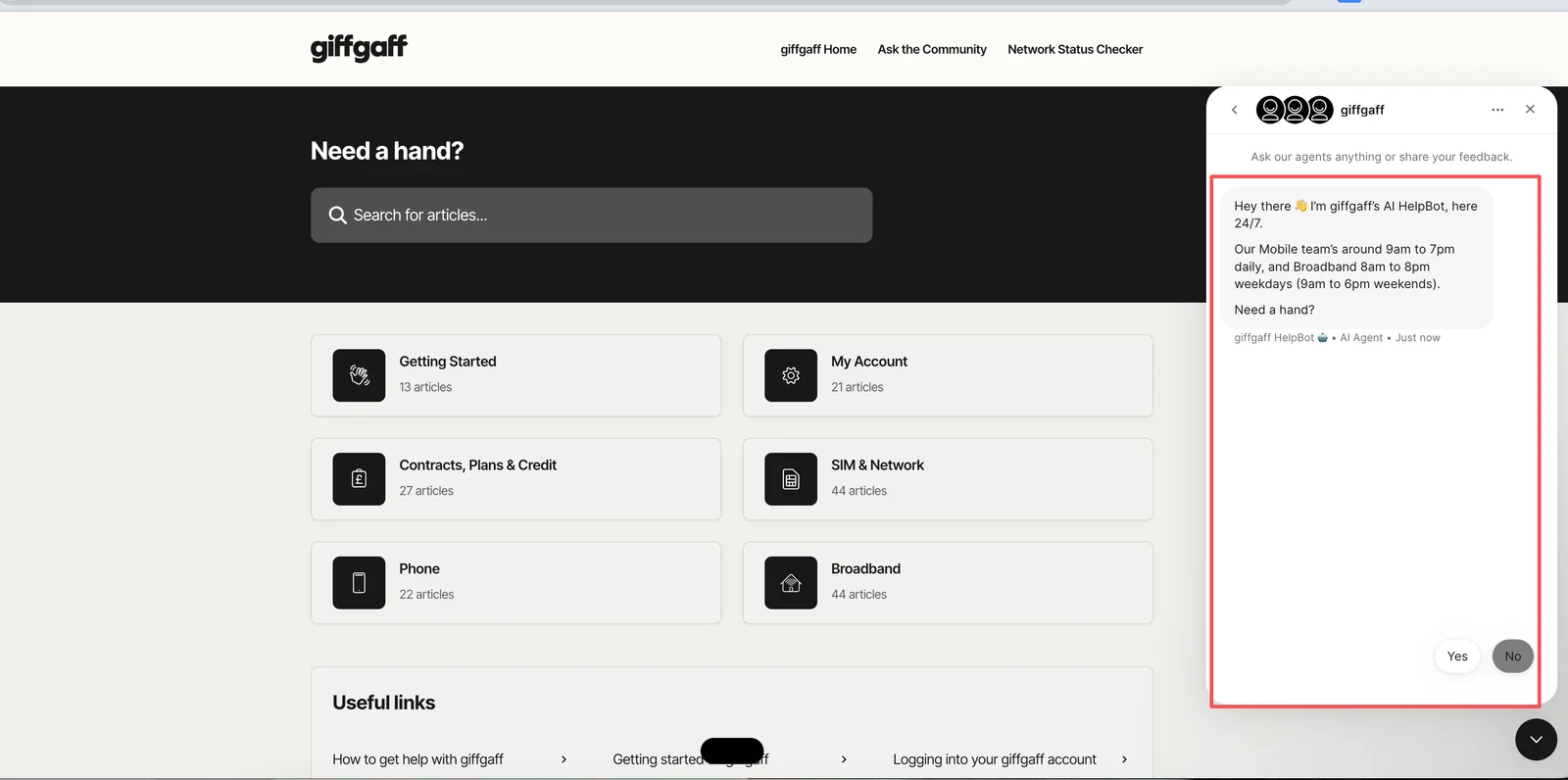
If the chat window shows these options, do the following:
- check_circleClick "I need some help".
- check_circleChoose "giffgaff mobile".
- check_circleType "Can I speak to an agent?" in the chat.
- check_circleFollow the chatbot's prompts to submit your issue and ask a human agent to check your SIM activation, roaming network and SMS service.
A message template for support
If you're not sure how to explain it, copy this:
Subject: Unable to send SMS

Hello giffgaff Support,

I'm currently using my giffgaff SIM card.

My SIM was activated more than 24 hours ago, and I have sufficient PAYG credit. However, I'm still unable to send SMS messages.

I've already tried the following steps:

1. Restarted my phone and toggled airplane mode on and off.
2. Tried manually selecting different local networks.

The issue still persists.

Could you please check whether my SIM card is fully activated and whether outgoing SMS and international roaming services are working properly on my account?

Thank you for your help.
It also helps to include your phone model, giffgaff UK number, the carrier you're connected to and a screenshot of the failed text.
8. Summary: check in this order to find the cause faster
Check in this order:
- check_circleActivated less than 24 hours ago: confirm activation progress and toggle Airplane Mode so the phone reconnects.
- check_circleActivated over 24 hours ago: check the recipient uses the international format, +86 plus the 11-digit number.
- check_circleFormat is right but it still fails: select China Mobile or China Unicom manually to re-register on roaming.
- check_circleShows sent but never arrives: test with a Unicom or Telecom number to rule out international SMS blocking on the receiving side.
- check_circleNothing works: contact a human agent through the giffgaff help centre and ask them to check activation and outgoing SMS.
If ordinary texts send fine and only one overseas platform's verification text fails, also check whether that platform accepts verification texts to its designated number from a roaming number.
For more causes, such as the SMS centre number, the roaming switch in your account and texts going out on the wrong SIM, see giffgaff texts not sending: 7 causes and fixes.
Final reminder: check activation time, the number format and the roaming network first. Don't keep topping up or replacing the SIM every time a text fails.
If you bought your giffgaff UK SIM from LarkSIM and this guide doesn't solve it, gather your balance page, the failed-text screenshot and your test results and contact our support team for help.
Official references
- check_circleActivating your giffgaff SIM
- check_circleHow to perform a manual roam
- check_circlegiffgaff roaming rates in China
- check_circlegiffgaff help centre
- check_circleHow to get help with giffgaff
FAQ
Real UK +44 number · Ships from China · Chinese setup guides
giffgaff UK physical SIM
Register and manage a real UK mobile number yourself, shipped from local stock in China. The self-service SIM suits people who already have a way to top up; the worry-free SIM includes an official £10 top-up voucher.