ENC Mobile activation guide: done in 7 steps, with Wi-Fi Calling setup for iPhone and Android
Before activating, have ready: the SIM card (the ICCID is on the back), an email address you use regularly, and an adult's date of birth. Once you have the ENC physical SIM, open the official activation link: https://www.encmobile.com/activation/first
On this page
- 1. Step 1: Enter and verify the ICCID
- 2. Step 2: Confirm the plan
- 3. Step 3: Choose how to get your number
- 4. Step 4: Fill in your details
- 5. Step 5: Other services (optional)
- 6. Step 6: Enable Wi-Fi Call and confirm activation
- 7. Step 7: Wait for activation to take effect
- 8. Tips
- 9. Using it after activation: iPhone and Android
- 10. 1. iPhone
- 11. 2. Android
- 12. 3. If it cannot be set up on the phone
- 13. 4. Everyday reminders
- 14. FAQ: 1. Phone and network
- 15. FAQ: 2. Wi-Fi Calling
- 16. FAQ: 3. Texts and verification codes
- 17. FAQ: 4. Account and charges
- 18. FAQ: 5. Contacting support
- 19. Related guides
Don't have an ENC SIM yet? Buy the US T-Mobile physical SIM (ENC); once it reaches you in China, activate it with the 7 steps below.
Step 1: Enter and verify the ICCID
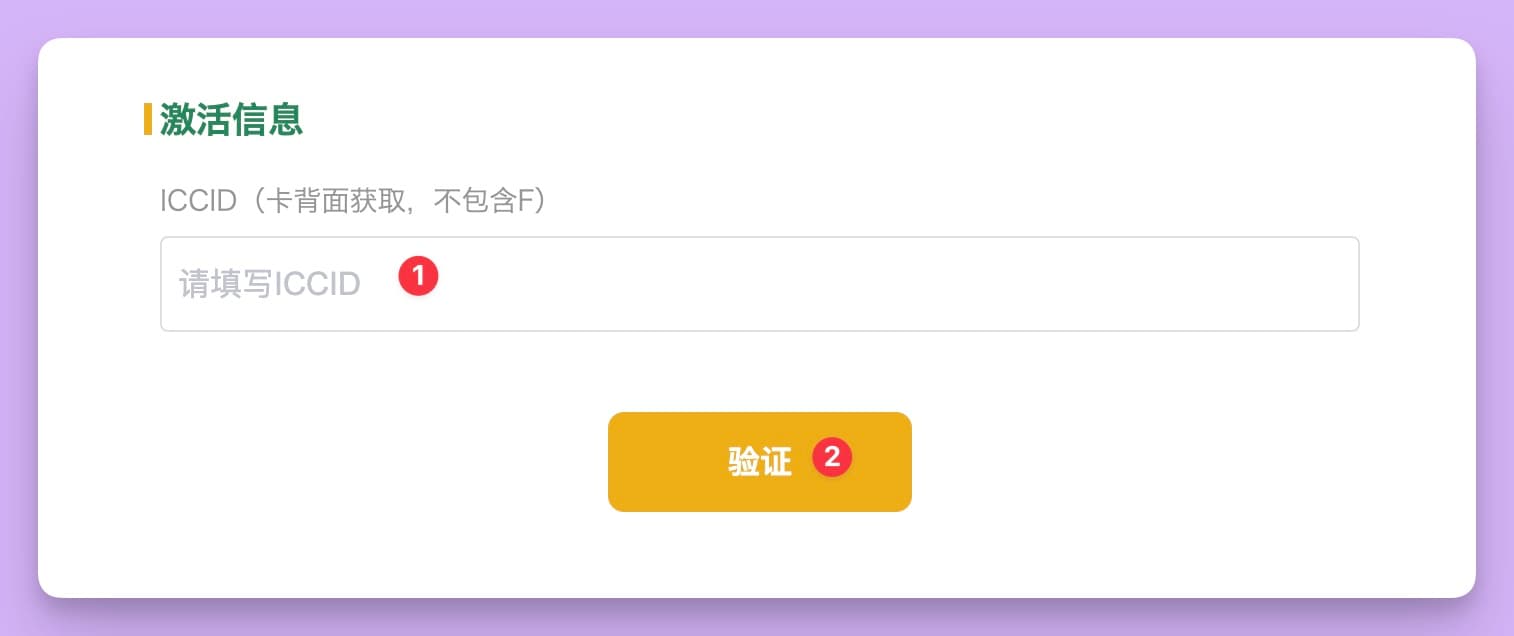
1. Open the official ENC Mobile activation page and go to the Activation details page.
2. Enter your ICCID in field (1). The ICCID is printed on the back of the SIM card and has 19 digits.
3. Then click the Verify button at (2). Once the check passes, you move to the next step.
Step 2: Confirm the plan
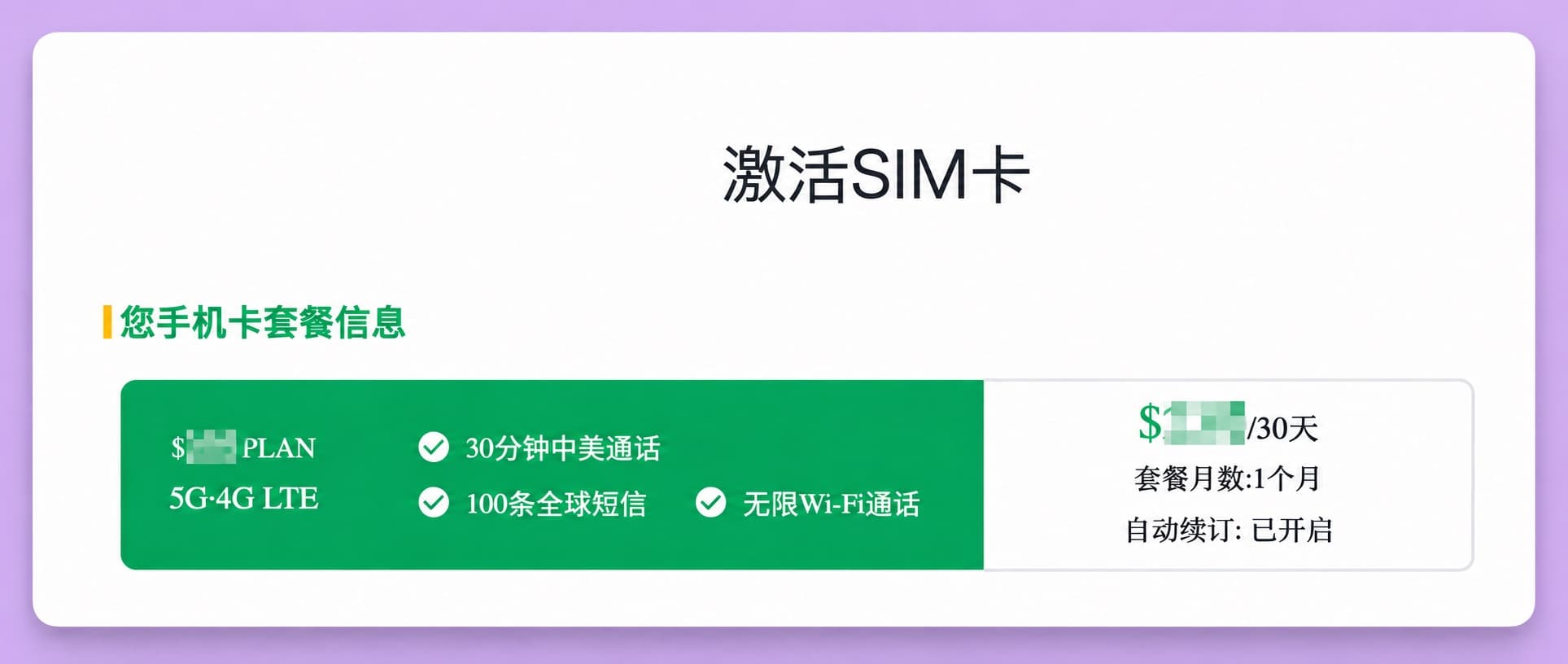
After verification, the page switches to Activate SIM and shows this SIM's plan under Your SIM plan.
The plan term is 1 month and includes 30 minutes of China–US calls, 100 global texts and unlimited Wi-Fi Calling
Step 3: Choose how to get your number
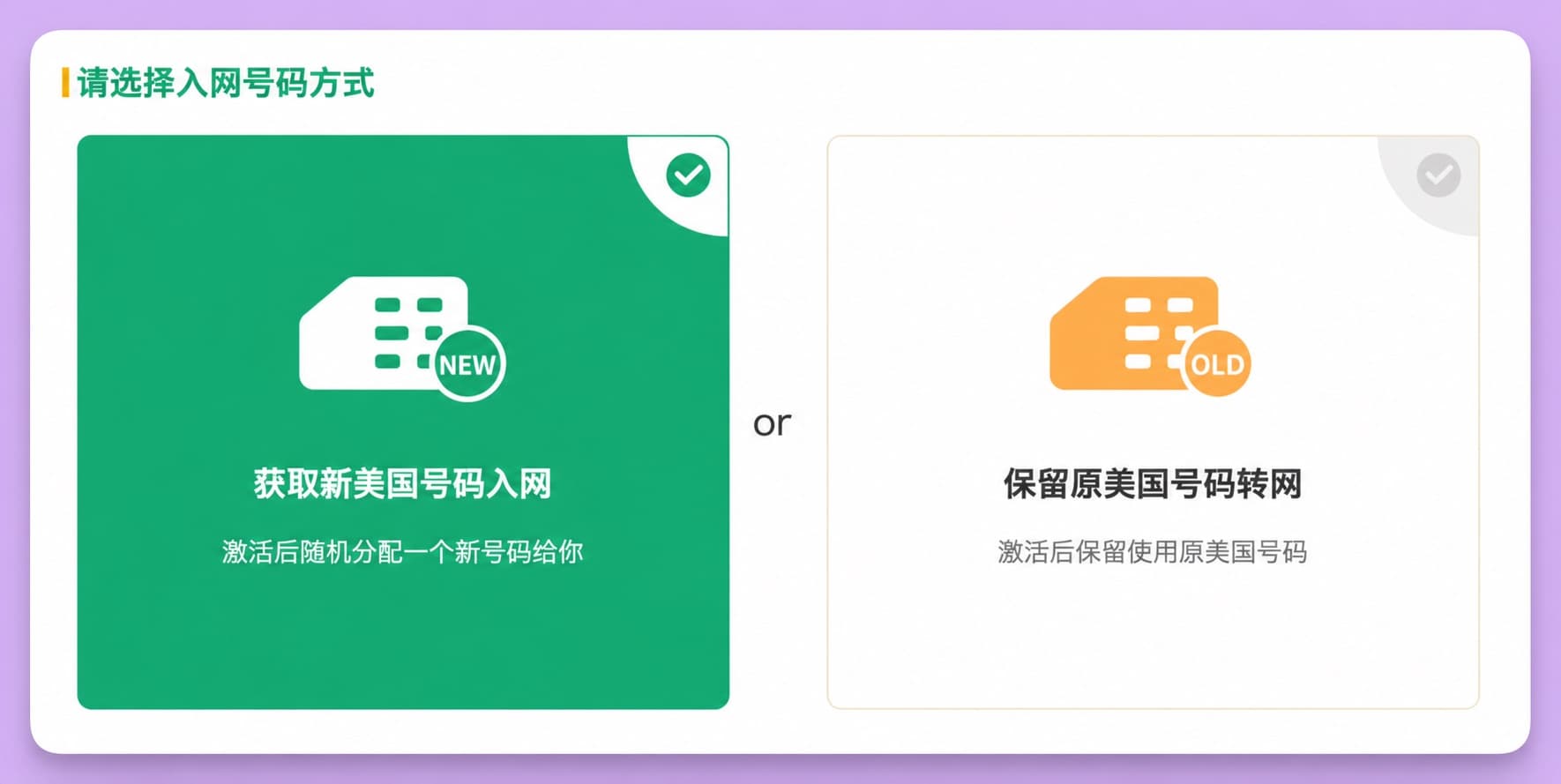
There are two options; pick the one you need.
- check_circleGet a new US number: the system randomly assigns you a new US number after activation. Most people do not already have a US number, so choose this.
- check_circleKeep your existing US number (port in): keep using your current US number after activation. Choose this if you already have one.
After choosing, click the continue button on the page.
Step 4: Fill in your details
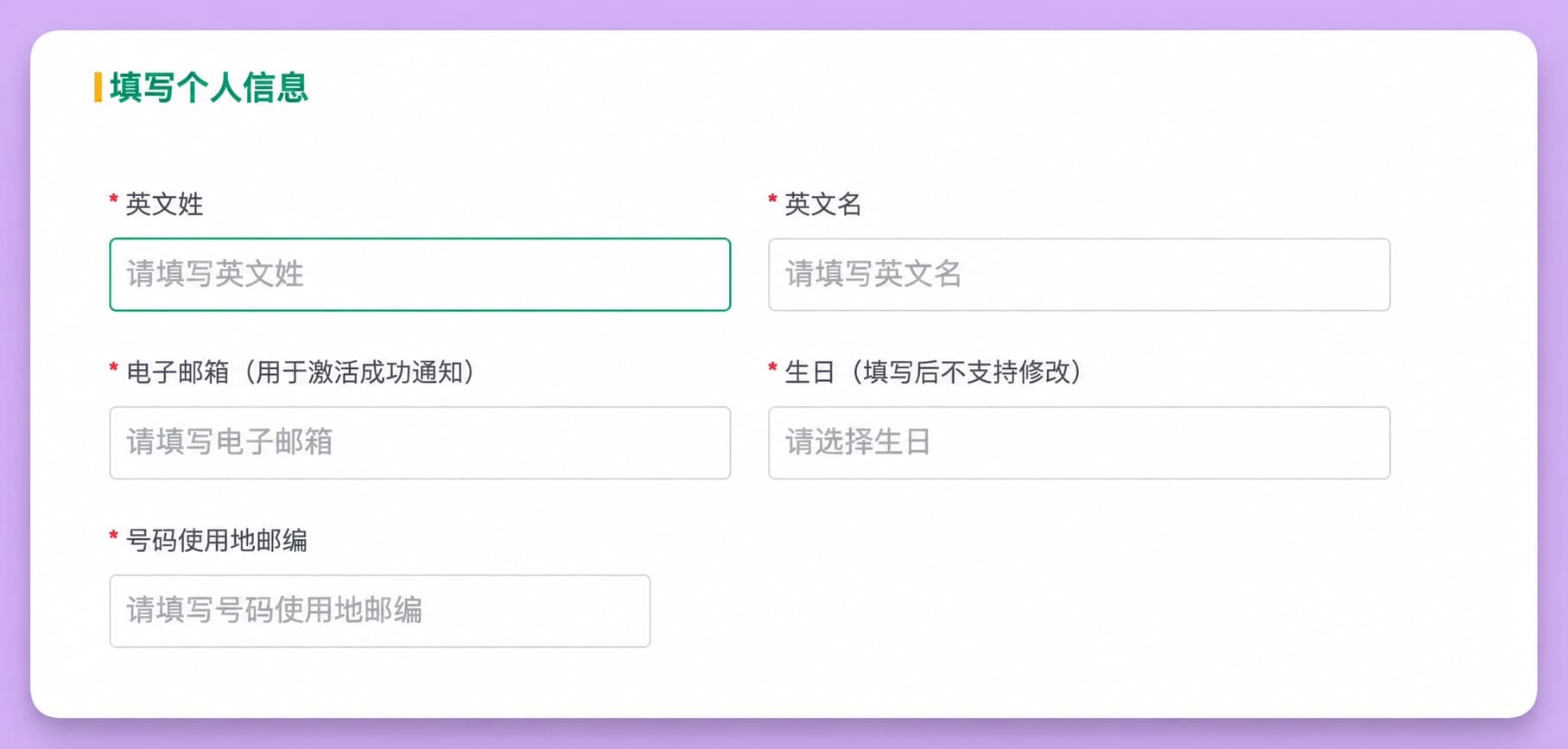
On the personal details page, fill in these required fields marked with *:
- check_circleLast name: your surname in English (pinyin).
- check_circleFirst name: your given name in English (pinyin).
- check_circleEmail: use an email you check regularly; the activation notice and later account information go here, and a rarely used inbox makes them easy to miss.
- check_circleDate of birth: pick a date; you just need to be an adult.
- check_circleZIP code where the number is used: this ZIP code affects the plan's taxes, so a ZIP code in a state without sales tax saves you sales tax.
Check everything once more before continuing.
Step 5: Other services (optional)
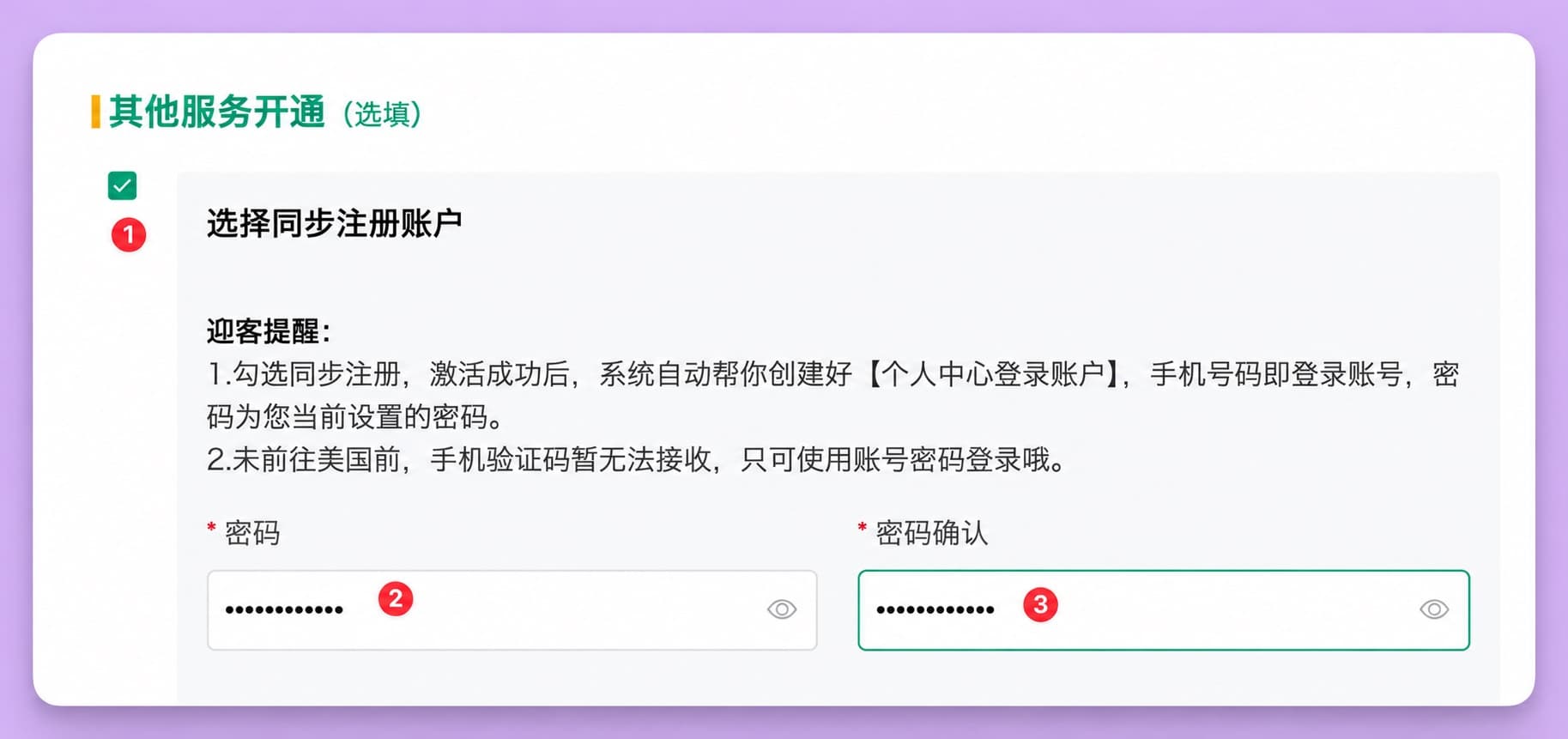
1. Tick Register an account at the same time at (1). After activation, the system creates your account-centre login: your phone number is the username and the password is the one you set here.
2. Enter a password at (2) and enter it again at (3); the two must match.
Step 6: Enable Wi-Fi Call and confirm activation
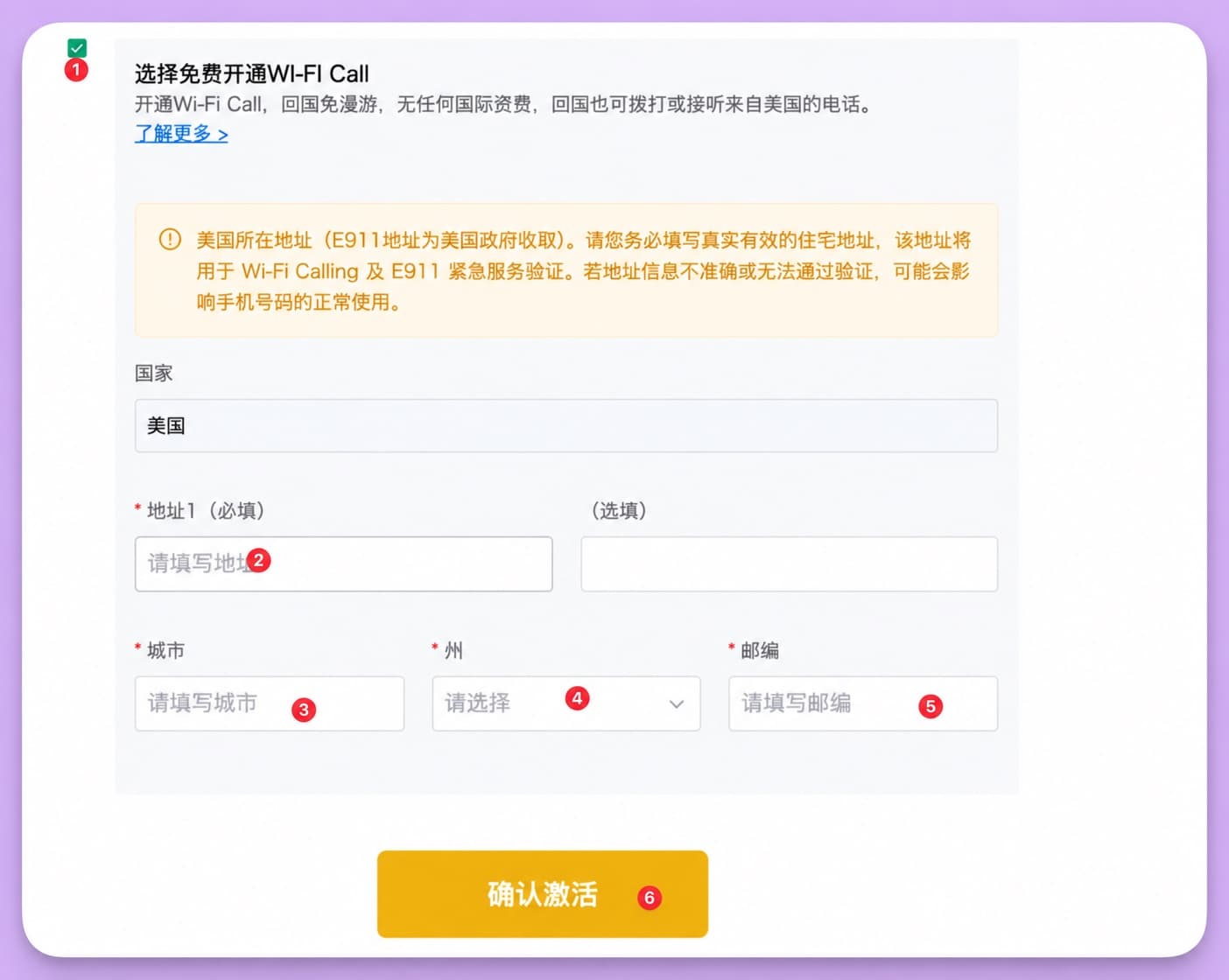
1. Be sure to tick (1) Enable Wi-Fi Call for free. Using this SIM in China depends on Wi-Fi Calling; without it the SIM will not work properly. With it, there is no roaming and no international charge back in China.
2. Enter a US address; the country defaults to United States:
- check_circle(2) Address line 1 (required): the street address; the optional field on the right is for apartment or unit details.
- check_circle(3) City: the city.
- check_circle(4) State: choose from the drop-down. The state must match the state of the ZIP code where the number is used, entered earlier.
- check_circle(5) ZIP code: the matching ZIP code.
3. When everything is filled in, click (6) Confirm activation to submit.
Wi-Fi Calling is only enabled once the status shows Enabled
Step 7: Wait for activation to take effect
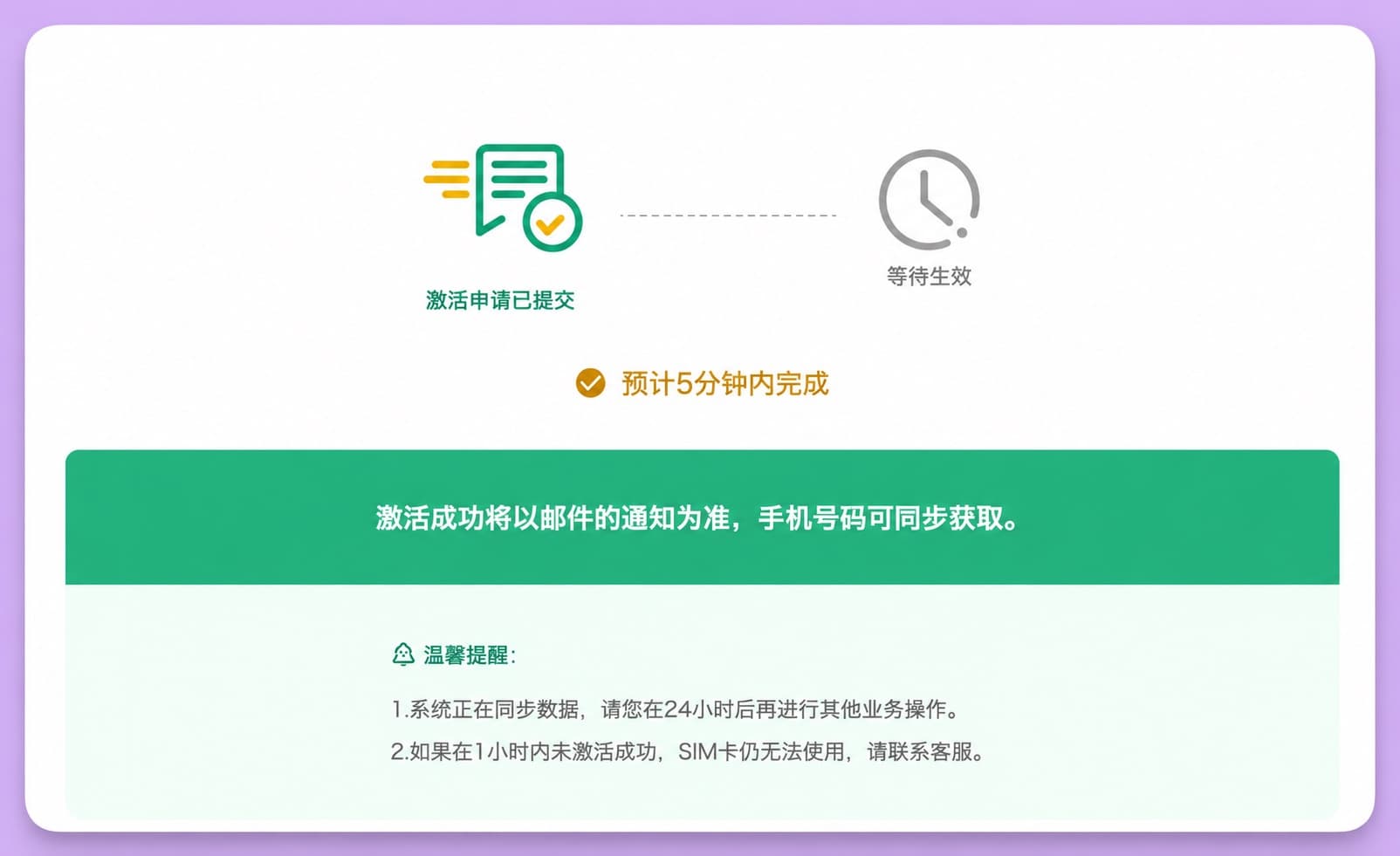
After clicking Confirm activation, the page shows Activation request submitted with the status Waiting to take effect, expected within 5 minutes.
- check_circleGo by the email notice: whether activation succeeded is shown in the email sent to the address you entered, which also gives you the phone number.
- check_circleWait 24 hours before other changes: the system is syncing data, so wait 24 hours before other account operations.
- check_circleContact support if it takes too long: if activation has not succeeded within 1 hour and the SIM still does not work, contact support.
That completes activation.
Tips
- check_circleLeave the trailing F off the ICCID.
- check_circleDouble-check your date of birth and email; the date of birth cannot be changed.
- check_circleThe state and ZIP code in the address must match, or verification may fail.
- check_circleFor use in China, always enable Wi-Fi Call.
Using it after activation: iPhone and Android
Before you start
- check_circleThe phone must be unlocked and support VoLTE. You can check it on the official device check page by entering the IMEI (dial *#06# to see it).
- check_circleAfter activation, wait for the email notice and at least 24 hours before other operations.
- check_circleIn China it works over Wi-Fi Calling, so you do not need this SIM's data or a roaming pack.
1. iPhone
1. Insert the SIM
- check_circleUse the SIM tool to remove the tray, insert the ENC SIM, put the tray back and turn the phone on.
- check_circleOn a dual-SIM iPhone, use this as the secondary line and keep your Chinese SIM as the primary.
2. Make sure the SIM is on
- check_circleOpen Settings > Cellular, find the ENC SIM under SIMs and check it is turned on.
- check_circleGive the two lines labels such as China and US ENC to avoid mixing them up.
3. Turn on Wi-Fi Calling
Connect to Wi-Fi first. Go to Settings > Cellular and tap the ENC line. Find Wi-Fi Calling and turn on Wi-Fi Calling on This iPhone.
If an emergency address (E911) screen appears, enter the address you registered at activation and confirm. After a moment, Wi-Fi appears after the carrier name in the status bar, meaning it is working.
4. Check it works
- check_circleSend a text or make a call to the US number from a Chinese phone and see whether it arrives.
- check_circleOr text yourself from this number to test sending and receiving.
5. Common problems
- check_circleNo Wi-Fi indicator: toggle Airplane Mode once, or try another Wi-Fi network.
- check_circleNo Wi-Fi Calling option: make sure the phone is unlocked and the software is up to date.
2. Android
1. Insert the SIM
Remove the tray, insert the SIM, put the tray back and turn the phone on. On a dual-SIM phone, use the secondary slot.
2. Make sure the SIM is on
Open Settings > Mobile network (or Connections, or SIM cards & networks) and check this SIM is turned on.
3. Turn on Wi-Fi Calling
Connect to Wi-Fi, go to Settings > Mobile network (or Connections / SIM cards & networks) and choose the ENC SIM.
Find Wi-Fi Calling and switch it on.
If asked for an emergency address, enter the address registered at activation; when the Wi-Fi Calling indicator appears in the status bar, it is working.
Menu locations vary by brand; if you cannot find it, search Settings for Wi-Fi Calling.
4. Note
Huawei phones may not be able to set up Wi-Fi Calling; keep this in mind before buying or using it.
3. If it cannot be set up on the phone
- check_circleSign in to the account centre on the official site, go to Services > WiFicalling > Enable for free, enter the 911 address and submit.
- check_circleIt is only enabled once the status shows Enabled.
- check_circleThe state and ZIP code entered at activation must match and the address must be real and valid, or enabling may fail.
4. Everyday reminders
- check_circleVerification codes: until Wi-Fi Calling is enabled, texts do not arrive.
- check_circleData: plan data generally works only in the US; in China use Wi-Fi.
- check_circleRenewal: LarkSIM support tops it up; the same plan costs ¥66–99 a month, depending on the tax in the number's state.
- check_circleGetting help: China support 400-990-6699, email help@encmobile.com, and ENC users can dial 611.
- check_circleOrders and renewals: for orders, shipping and renewal top-ups, email LarkSIM support at support@larksim.com with your order number.
FAQ: 1. Phone and network
Q: Which network does ENC Mobile use? Will my phone work?
ENC Mobile uses the T-Mobile 5G network. The phone must be unlocked and support 5G/4G LTE and VoLTE. Check compatibility on the official device check page by entering the IMEI (dial *#06# to see it).
Q: Can I use mobile data in China?
Plan data generally works only in the US; in China use Wi-Fi, so you do not need this SIM's data.
FAQ: 2. Wi-Fi Calling
Q: How exactly do I turn on Wi-Fi Calling?
The official site has a video tutorial on enabling Wi-Fi Call, or you can follow these steps:
- check_circleiPhone: insert the SIM and connect to Wi-Fi, go to Settings > Cellular > the ENC line > Wi-Fi Calling and turn on Wi-Fi Calling on This iPhone.
- check_circleAndroid: go to Settings > Mobile network or SIM cards > this SIM > Wi-Fi Calling and turn it on. Some models hide this option.
- check_circleThe phone may show an emergency address screen when you turn it on; if you entered it during activation, you usually do not need to again.
Q: What if Wi-Fi Calling cannot be turned on in the phone?
Sign in to the official site, go to Services > WiFicalling > Enable for free, enter the 911 address and submit; it is only enabled once the status shows Enabled.
Q: Which phones may not support Wi-Fi Calling?
Huawei phones may not be able to set up Wi-Fi Calling; keep this in mind before using it.
FAQ: 3. Texts and verification codes
Q: What if texts or verification codes do not arrive?
Texts do not arrive until Wi-Fi Calling is enabled. First check that the Wi-Fi Calling indicator is in the status bar, then test. Toggle Airplane Mode once or try another Wi-Fi network. Whether a particular service's code arrives also depends on that service's SMS rules.
Q: How do I text the US number from a Chinese phone to test it?
Add the US country code: enter +1 followed by the 10-digit US number. For example, for 212-555-0123 enter +12125550123, without dashes or spaces.
1. Open the messaging app and start a new message.
2. Enter the full number starting with +1 as the recipient, write something and send.
3. Long-press 0 on the dial pad to type +. If you cannot type +, use 001 instead: 0012125550123.
FAQ: 4. Account and charges
Q: How do I sign in to the account centre, and what can I do there?
Go to the sign-in page and sign in with your phone number and password (the one set at activation). You can check the plan status, expiry date and usage; for renewals, contact LarkSIM support.
Q: How much will actually be charged?
Renewals are topped up by LarkSIM support; the same plan costs ¥66–99 a month, depending on the tax in the number's state.
Q: How do I cancel auto-renew?
Please contact support to cancel auto-renew.
Q: What happens if the number goes unused for a long time?
The number is cancelled after 30 days suspended, so contact support to renew before it expires.
FAQ: 5. Contacting support
Q: How do I contact support?
Activation failures, or Wi-Fi Calling will not turn on:
- check_circleEmail: help@encmobile.com, reply within 24 hours.
- check_circleChina support: 400-990-6699.
- check_circleUS support: 909-666-1188.
- check_circleENC users can dial 611.
Orders, shipping and renewal top-ups:
LarkSIM support: support@larksim.com; please include your order number.
Real +1 number · T-Mobile network · Card checked before dispatch
US T-Mobile physical SIM (ENC)
A real US +1 mobile number, not VoIP, delivered as a physical SIM to your address in China. Check the current price, Wi-Fi Calling and keep-number notes on the product page before ordering.