How to top up hahaSIM and keep the number long term: a step-by-step guide
A hahaSIM top-up of HK$10 or more extends validity by 365 days, but balance is not validity and a data pack does not renew the number. Both top-up methods and long-term habits explained.
On this page
- 1. 1. How do hahaSIM top-ups and keeping the number work?
- 2. 2. How much do you need to top up hahaSIM each year?
- 3. 3. Before topping up, check when your number expires
- 4. 4. Method 1: top up in the haha TRAVEL app
- 5. 5. Method 2: try a HK$10 top-up on 3HK's official website
- 6. Why do you still need to top up when there is balance left?
- 7. How to keep a hahaSIM number long term at low cost
- 8. hahaSIM top-up FAQ
Already bought a hahaSIM but not sure how to top it up?
You heard that topping up just HK$10 a year keeps a Hong Kong number long term, but the haha TRAVEL app may show HK$20 as the lowest amount. So should you add HK$10 or HK$20?
Can you pay with mainland Alipay or WeChat Pay? Why does the card still need renewing when there is balance left? If you forget to top up, is the number gone?
This guide answers all of that. It is a top-up and keep-number guide for hahaSIM users, and does not repeat buying the card, inserting it or first activation.
1. How do hahaSIM top-ups and keeping the number work?
hahaSIM is a rechargeable SIM launched by Fortress in Hong Kong, with mobile service provided by Hutchison's 3HK. It is a stored-value card with no compulsory monthly fee.
However, no monthly fee does not mean the number is kept forever. There are two separate ideas here.
Account balance
The account balance is the stored value in your hahaSIM that can pay for calls, texts or plans. For example, if you bought the version with HK$50 stored value, after activation the account has that balance available, as long as nothing else was charged.
If you later buy a HK$10 roaming plan, the balance may drop to HK$40. If you then top up HK$20, it may rise to HK$60.
SIM validity
Validity is how long the carrier lets this stored-value card keep working. According to Fortress's official FAQ:
- check_circleAfter first activation, hahaSIM is valid for 365 days.
- check_circleA single top-up of HK$10 or more extends validity by 365 days.
- check_circleBuying a data plan alone does not extend the number's validity.
- check_circleIf you do not act after it expires, the number may be lost.
So even with HK$40 in the account, the number can still expire. Having enough balance and being within validity are two different things.
2. How much do you need to top up hahaSIM each year?
Under Fortress's current public rules, a single top-up of at least HK$10 meets the amount needed to extend validity by 365 days.
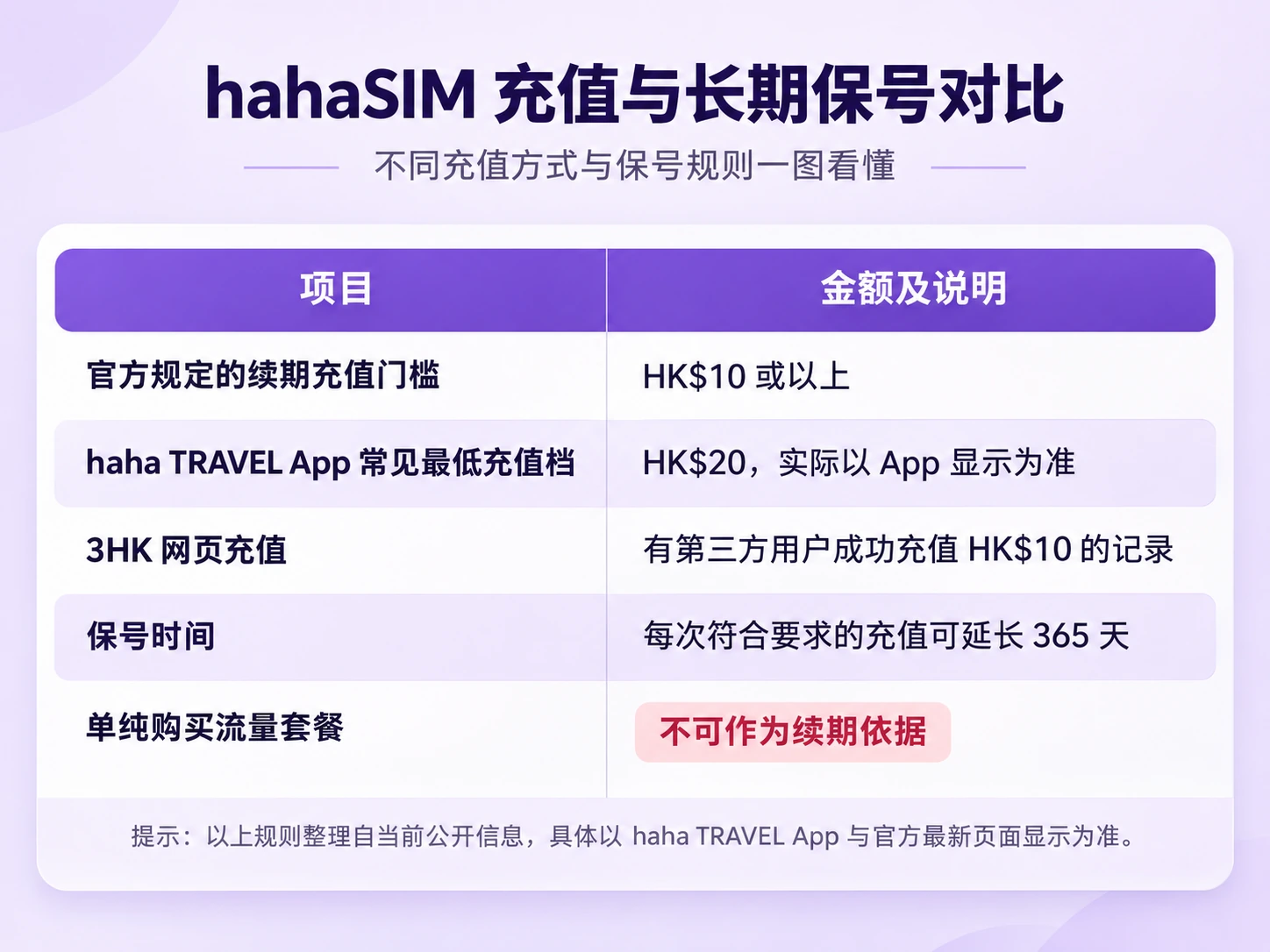
In other words, HK$10 is the lowest renewal top-up Fortress currently publishes, but not every payment entry offers a HK$10 option. For example, some users can only choose HK$20 and up in the haha TRAVEL app, while users have in the past topped up a custom HK$10 on 3HK's official online top-up page and seen the number's validity extended.
How well each channel works right now is not fully clear. Fortress's latest FAQ specifically notes that if the account looks wrong after a top-up, you should check whether you topped up through the haha TRAVEL app rather than another website.
If you want a safe renewal, use the haha TRAVEL app first. If you want to try the HK$10 minimum, you can look at 3HK's official web top-up, but you must confirm the money actually reached the account and the validity really changed.
3. Before topping up, check when your number expires
Open the haha TRAVEL app first and check the number's current status.
Step 1: open the haha TRAVEL app
If you are not logged in, enter your Hong Kong number, ICCID and other details as prompted. If login fails, check your network first. Fortress suggests logging in over Wi-Fi.
Step 2: go to Account (账户)
Step 3: find "Valid until" (有效期至)
If the page shows Valid until: 27/05/2027, the number currently expires on 27 May 2027. Note that Hong Kong apps often use the day/month/year format.
Step 4: note the expiry date
Save the date in your phone's calendar with reminders 30, 7 and 3 days before. A top-up does not always go through at once. You may hit app login problems, card payment failures, network issues or even carrier maintenance, so preparing early is much safer than dealing with it on the last day.
4. Method 1: top up in the haha TRAVEL app
This is the method I recommend for beginners, because haha TRAVEL is Fortress's official SIM management app, where you can check the balance, top up and see top-up records.
Step 1: log in to the app
Open haha TRAVEL, go to the Account page and check the number is correct. If you manage several Hong Kong numbers, make sure you are working on the hahaSIM number you want to keep.
Step 2: open the top-up entry
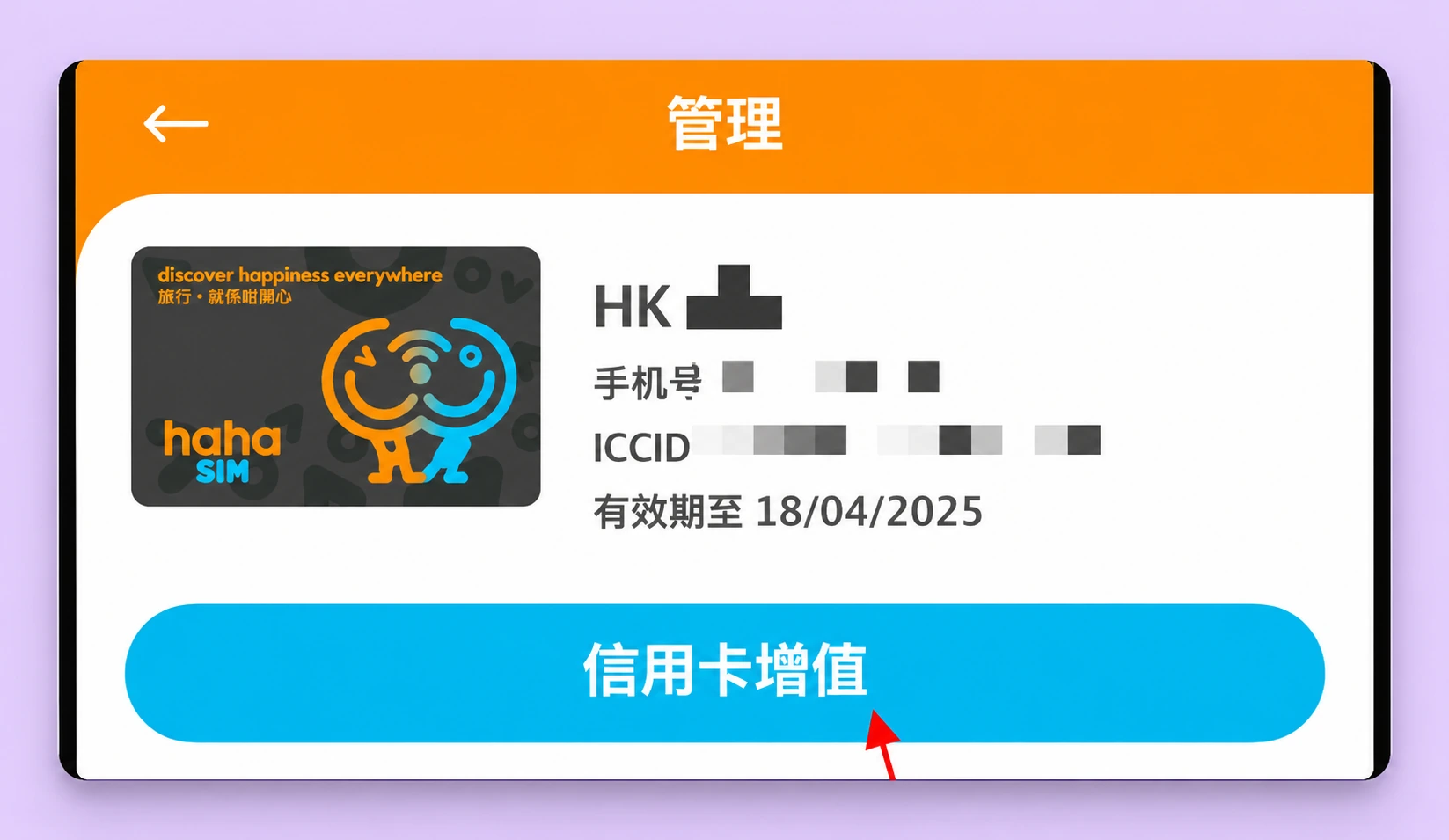
Look for Manage (管理), Add value (增值), Balance top-up (余额增值) or a similar top-up entry. The layout may differ between app versions. In older versions the path is Home → Account/Manage → Add value → Balance top-up, which opens the page for choosing an amount.
Be careful not to open the Data Plans (数据计划) page by mistake. What we are doing now is adding value to the stored-value account, not buying roaming data.
Step 3: choose the amount
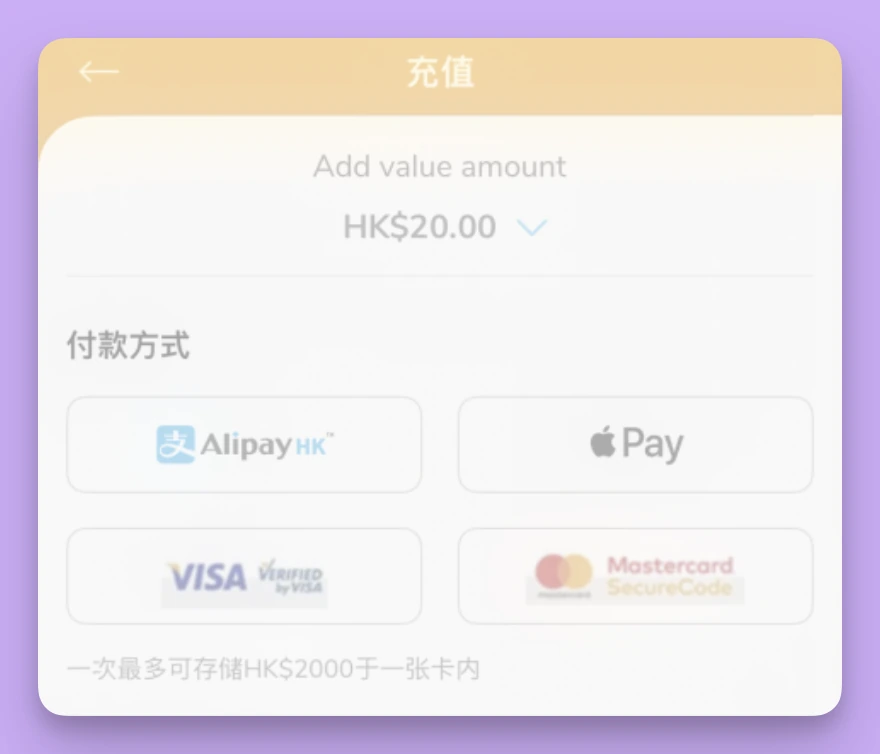
On the top-up page, look at the amounts offered. Third-party tests show the haha TRAVEL app has offered amounts starting at HK$20, so seeing HK$20, HK$50 and similar options is normal. If a custom amount option appears, enter an amount that fits the current rules and the page's minimum.
A reminder: Fortress requires at least HK$10 per top-up to extend validity, but does not promise the app will let you add as little as HK$10.
If the app's current minimum is HK$20, topping up HK$20 also meets the official renewal amount.
Step 4: choose a payment method
Common payment methods are Visa, Mastercard, Google Pay, Apple Pay and AlipayHK (Alipay Hong Kong). Whether each is supported, and whether cards issued in mainland China go through, depends on the payment page at the time.
Note: AlipayHK and mainland China Alipay are not the same payment account system. If the page only supports AlipayHK, do not assume mainland Alipay will work.
With a credit card you may also run into international transaction limits, issuer verification and currency conversion fees. Choose a payment method you can verify yourself without trouble.
Step 5: check the details and pay
Check these 5 things before you pay, then submit:
Whether the hahaSIM number is correct, and whether the amount is correct. Whether it is a balance top-up rather than a data plan. The payment currency and the actual amount charged. Whether there are extra fees or auto-renewing items.
Step 6: check the result
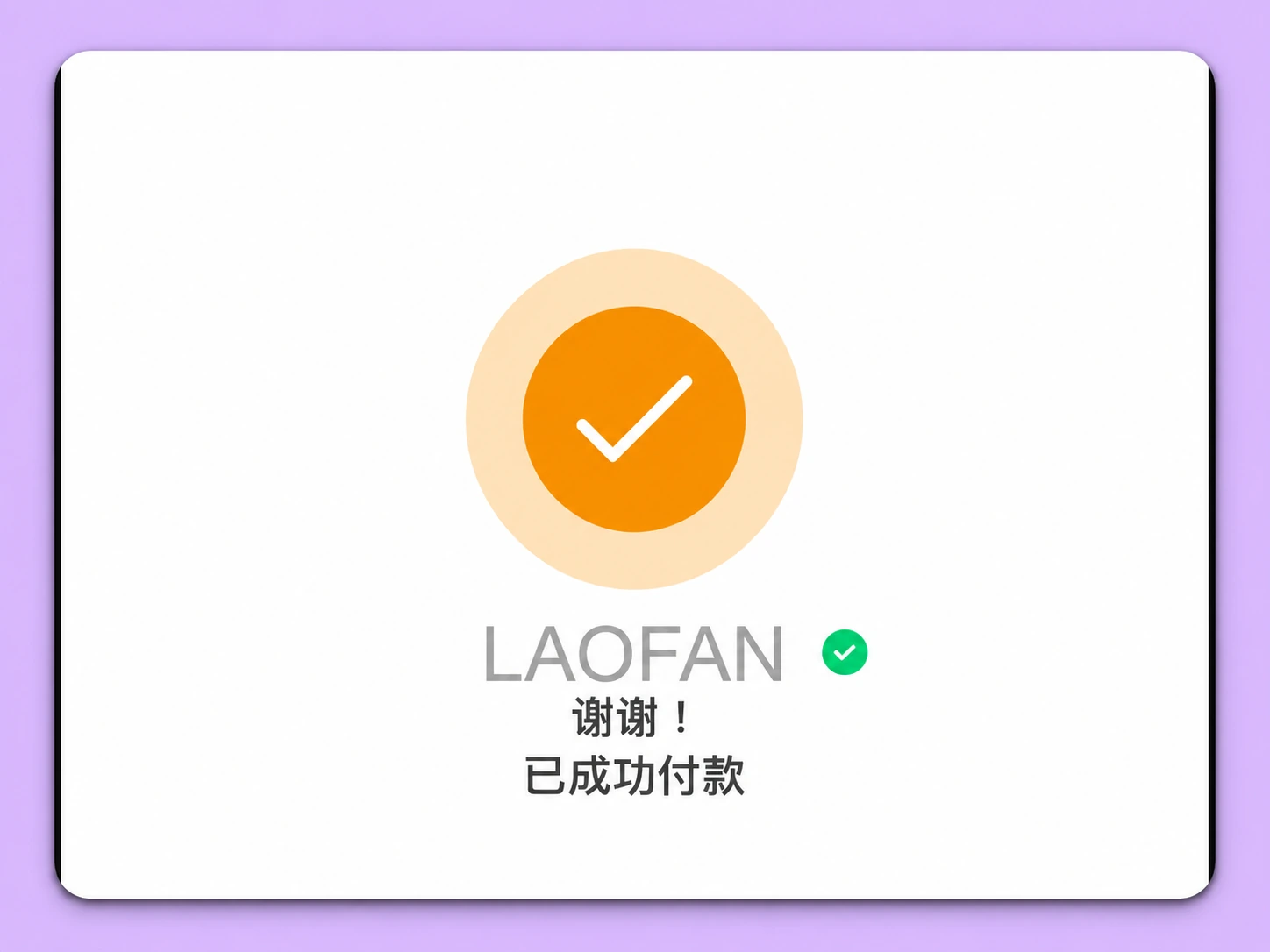
After paying, do not close the page right away. Save the following: the success page, the amount paid, the date, the transaction number and the receipt. Then go back to the Account page in haha TRAVEL and check that the balance went up.
5. Method 2: try a HK$10 top-up on 3HK's official website
Step 1: open 3HK's online top-up page
Official entry: https://www.three.com.hk/3Care/chi/prepay/payonline1.jsp. This is 3HK's official site on the three.com.hk domain, and it opens the Online Top-up (網上增值) page.
Step 2: enter your Hong Kong number
The page asks for the stored-value card number twice: the stored-value card number, and the same number again.
hahaSIM uses an 8-digit Hong Kong number, for example 6XXX XXXX. You usually enter just the 8 digits, without the +852 country code.
Step 3: enter the image code
Type the code shown on the page, then tap Next (下一步). If the code is wrong, refresh it and try again. Do not use redirect links from unknown sources, and do not let anyone else fill in your payment details.
Step 4: fill in the receipt details
Based on what users have done before, the next page may ask for: the payer name on the receipt, an email for the e-receipt, the top-up amount and the payment method.
Step 5: choose a custom amount
Some third-party tests show a Custom (自定) amount option. If the page still offers it, try choosing a custom amount, enter HK$10, and see whether it lets you continue.
If the site rejects the amount, says it is below the minimum, or has no custom option, do not force it. Pick an amount the page actually allows, or go back to the haha TRAVEL app.
Step 6: choose a payment method
Past tests show the 3HK site has supported: mainland Alipay, WeChat Pay, Visa / Mastercard, UnionPay and other Hong Kong local payment methods. If you choose Alipay or WeChat Pay, the page may jump to that payment service. Check the payee, amount and currency there.
Step 7: pay and save the result
After payment, the site may show a message such as Top-up successful (成功增值) with the amount and phone number. Save that success page, and check that your card or payment app was actually charged.
Step 8: go back to haha TRAVEL and check validity
Open the haha TRAVEL app, go to Account and check two things:
First: did the balance go up? If you had HK$40, a successful HK$10 top-up with no other charges should in theory make it HK$50.
Second: was the validity extended? Only when the money has arrived and the expiry date has moved can you treat this top-up as having kept the number.
If the payment succeeded but the balance did not update or the validity did not change, a payment record alone does not prove the renewal worked. Keep the payment proof and contact official support.
Why do you still need to top up when there is balance left?
An example: you bought hahaSIM with HK$50 included. A year later you have made no calls and bought no plans, so the account may still hold HK$50, but the SIM is close to expiring.
That is because no monthly fee does not mean no validity period. The balance is money you can spend. Validity is how long the carrier keeps the number active. One does not replace the other.
So if expiry is close, top up again under the official rules even if there are still dozens of Hong Kong dollars left.
Can you use the remaining balance to buy a data pack instead?
According to Fortress's current official FAQ, buying a data plan does not count as renewal. Even with plenty of balance, or after buying a one-day data pass, do not assume the number has been extended for a year.
How to keep a hahaSIM number long term at low cost
Plan A: play it safe
For users without much experience. The approach:
1. Use the official haha TRAVEL app.
2. Add value before expiry.
3. Pay the amount the app currently allows.
4. Check the balance and expiry date.
5. Save the success record.
6. Set a reminder for next year.
If the app minimum is HK$20, you spend about HK$20 a year. That HK$20 goes into your stored-value balance. It is not a keep-number fee that is charged separately and used up immediately.
Plan B: try a smaller top-up each time
For users comfortable with web top-ups. The approach:
1. Before expiry, visit 3HK's official online top-up page.
2. Try a custom HK$10 top-up.
3. Pay with a method currently available.
4. Save the transaction proof.
5. Check the balance and validity in haha TRAVEL.
6. If the renewal did not go through, contact official support promptly and switch to an accepted top-up channel.
If you can make a qualifying HK$10 top-up every year, five years cost HK$50. At HK$20 a year, five years cost HK$100. This is only an amount comparison, not a promise that policies, channels and minimums stay the same for five years.
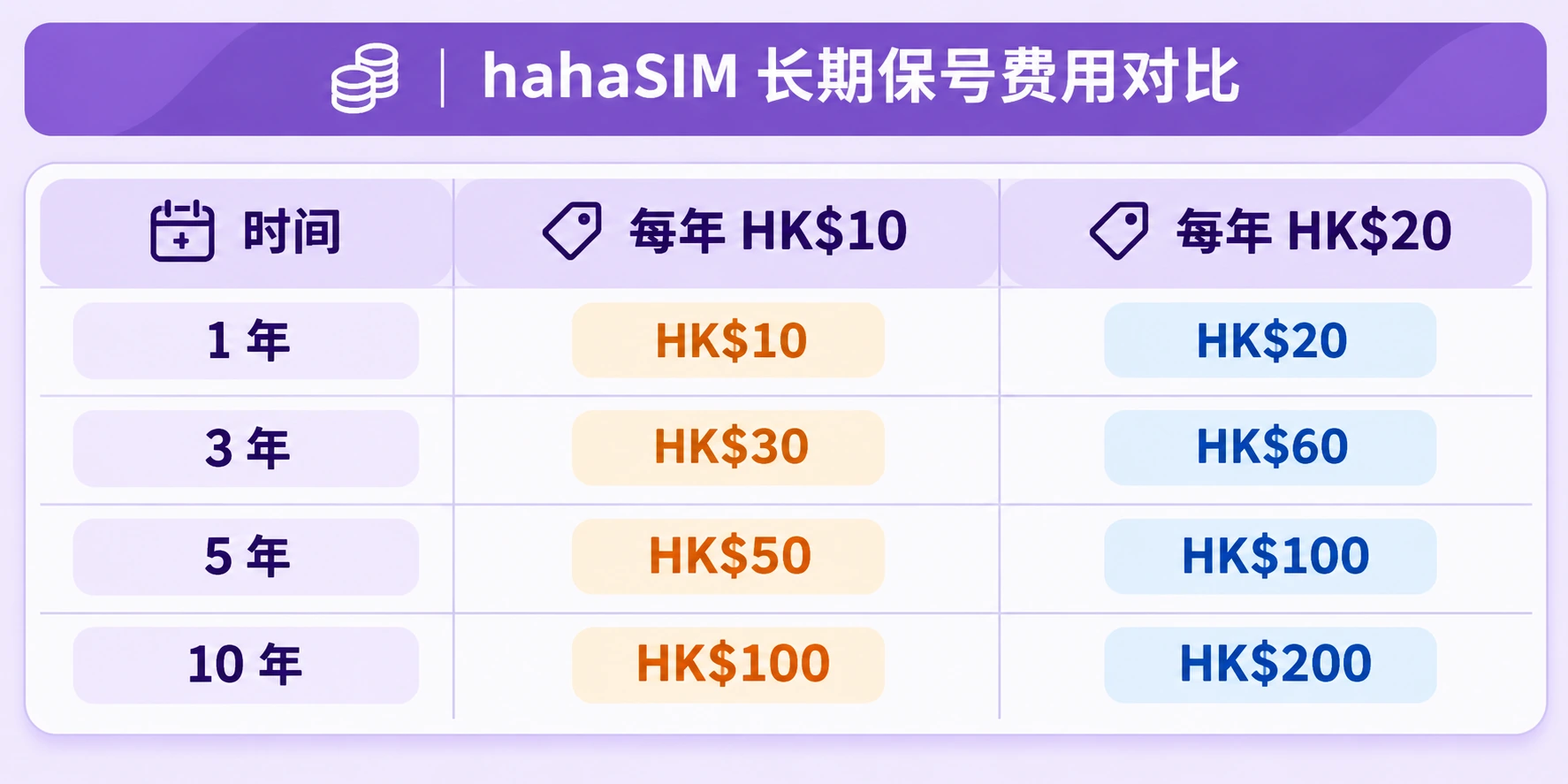
None of this includes buying the card, other usage, international payment fees or possible exchange rate differences.
My keep-number habits
Do not treat hahaSIM as a card you can buy and forget. Habits that work well long term:
- check_circleLog in to the app every month or two to check the number's status.
- check_circleSave the next expiry date in your phone's calendar.
- check_circleTop up early instead of paying on the expiry date.
- check_circleAvoid turning on auto-renewing data plans you do not need.
- check_circleKeep the top-up success text, payment records and screenshots of the validity.
- check_circleNow and then, check that the SIM still receives texts.
If the number is linked to a bank or other important accounts, set up a backup verification method so an expired number does not lock you out.
hahaSIM top-up FAQ
Q1: My hahaSIM still has balance. Can I skip topping up?
If the number is about to expire, top up under the renewal rules even if there is balance left, because balance and SIM validity are two different things.
Q2: Does a HK$10 top-up always extend hahaSIM by a year?
The current official rules confirm that a top-up of HK$10 or more meets the renewal amount. You still need to use a suitable channel and confirm the top-up succeeded and the validity updated. The amount paid alone does not prove renewal.
Q3: Others can top up HK$10, so why does my app ask for HK$20?
You may be using different channels. Fortress publishes the minimum renewal top-up, which does not mean every app version offers a HK$10 option. Third-party users have topped up a custom HK$10 on the 3HK website, but whether that channel works now depends on actual results and official confirmation.
Q4: Can I pay with mainland Alipay or WeChat Pay?
On 3HK's official web top-up, users have in the past paid successfully with mainland Alipay or WeChat Pay. The haha TRAVEL app and the 3HK site do not support exactly the same payment methods, so go by the live payment page and do not assume one channel supports what the other does.
Q5: Is the money I top up deducted right away?
Generally, topping up a stored-value card adds to the balance. It is not a keep-number fee deducted immediately. If you have auto-renewing plans, usage or other charges running, the balance may change afterwards.