hahaSIM Hong Kong SIM activation guide: activate it from mainland China, plus app binding, receiving texts and keeping the number
Insert the hahaSIM, get the activation text, then bind it in haha TRAVEL with the ICCID. Also covers receiving codes in mainland China, roaming data, top-ups to keep the number, and fixes for failed activation.
On this page
- 1. What this guide covers
- 2. 1. What is hahaSIM?
- 3. 2. What do you need before activating?
- 4. 3. Step 1: insert the hahaSIM
- 5. 4. Step 2: get your Hong Kong number
- 6. 5. Step 3: download the haha TRAVEL app
- 7. 6. Step 4: bind hahaSIM in the app
- 8. 7. Step 5: check the balance, number and expiry date
- 9. 8. Step 6: use hahaSIM in mainland China
- 10. 9. Does hahaSIM need real-name registration?
- 11. 10. How do you top up hahaSIM and keep the number long term?
- 12. 11. Common activation problems
- 13. 12. Summary: hahaSIM activation for beginners
Bought a hahaSIM but not sure how to activate it?
No signal after inserting the SIM, no activation text, no idea where to find the ICCID, or stuck binding the card after downloading the app?
This guide starts from zero and walks you through activating hahaSIM step by step. It uses the physical SIM throughout and is written for people using a Hong Kong SIM for the first time.
What this guide covers
1. What is hahaSIM?
2. What do you need before activating?
3. How do you insert the SIM and get your Hong Kong number?
4. How do you download the haha TRAVEL app?
5. How do you bind the SIM?
6. How do you use it and receive verification codes in mainland China?
7. How do you top up and extend the number's validity?
8. What if activation fails?
1. What is hahaSIM?
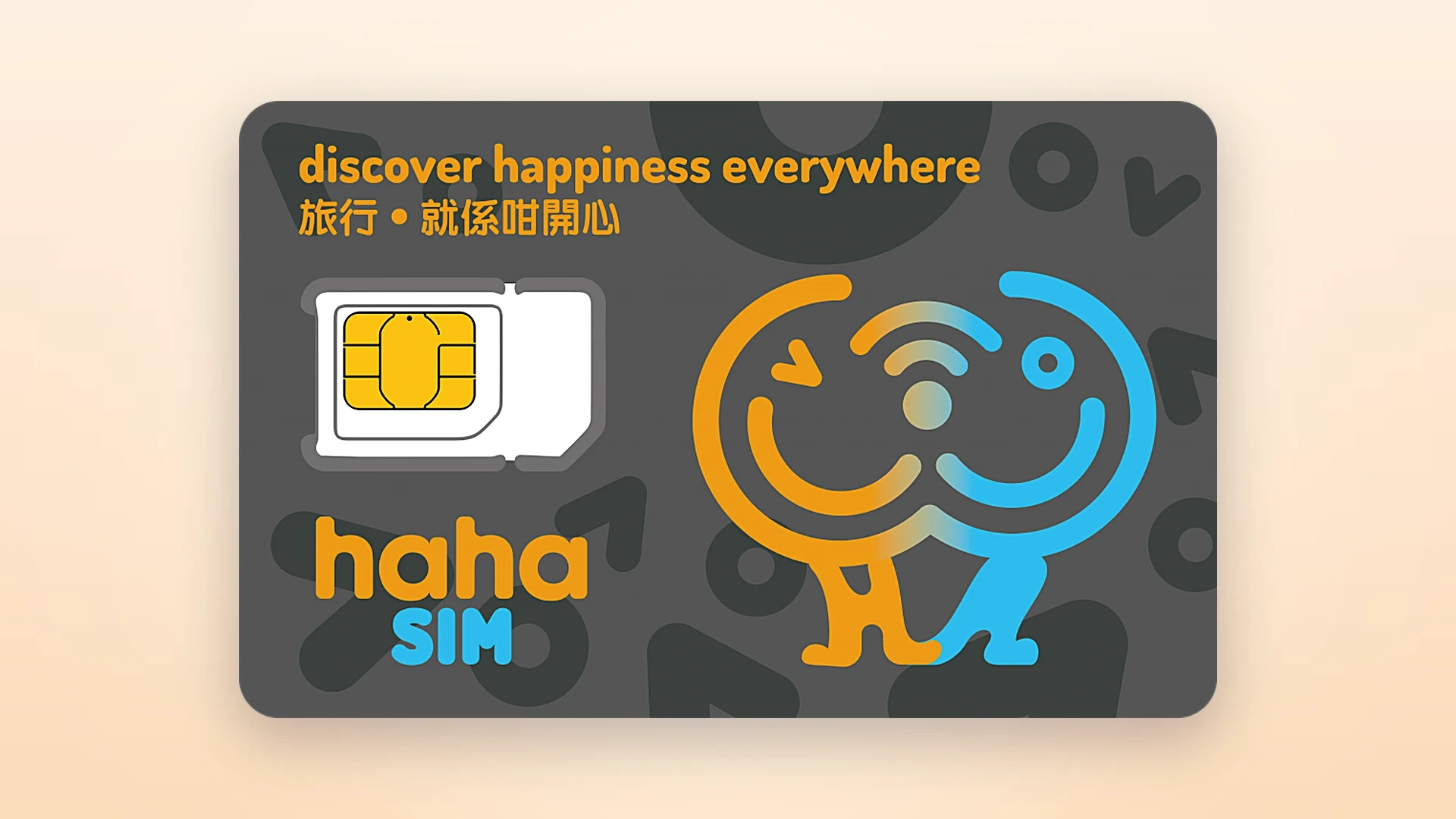
hahaSIM is a rechargeable travel SIM launched by Fortress in Hong Kong, with mobile service provided by 3HK. Its main features:
- check_circleNo fixed monthly fee: top up and buy plans as needed
- check_circleA Hong Kong mobile number: for calls and texts with services that accept Hong Kong numbers
- check_circleOverseas roaming: in many countries and regions, including mainland China
- check_circleExtendable validity: suits people who want to keep a Hong Kong number long term
- check_circleManaged in an app: check the balance, buy plans and top up in haha TRAVEL.
If you live in mainland China long term and only need a Hong Kong number now and then, you can consider it as a backup SIM.
Keep in mind that having a Hong Kong number does not mean every overseas platform will let you sign up. Some platforms may not accept certain numbers, or may have other verification limits on numbers.
2. What do you need before activating?
Before you start, have these ready:
- check_circleAn unactivated hahaSIM physical card
- check_circleAn unlocked phone that takes a physical SIM
- check_circleStable Wi-Fi for downloading and logging in to the app
- check_circleThe original SIM packaging and card holder
Important: do not throw away the card holder, because you need the QR code or ICCID on it the first time you bind the card in the app.
Also, hahaSIM currently cannot convert the physical SIM into an eSIM. This guide covers the physical SIM.
3. Step 1: insert the hahaSIM
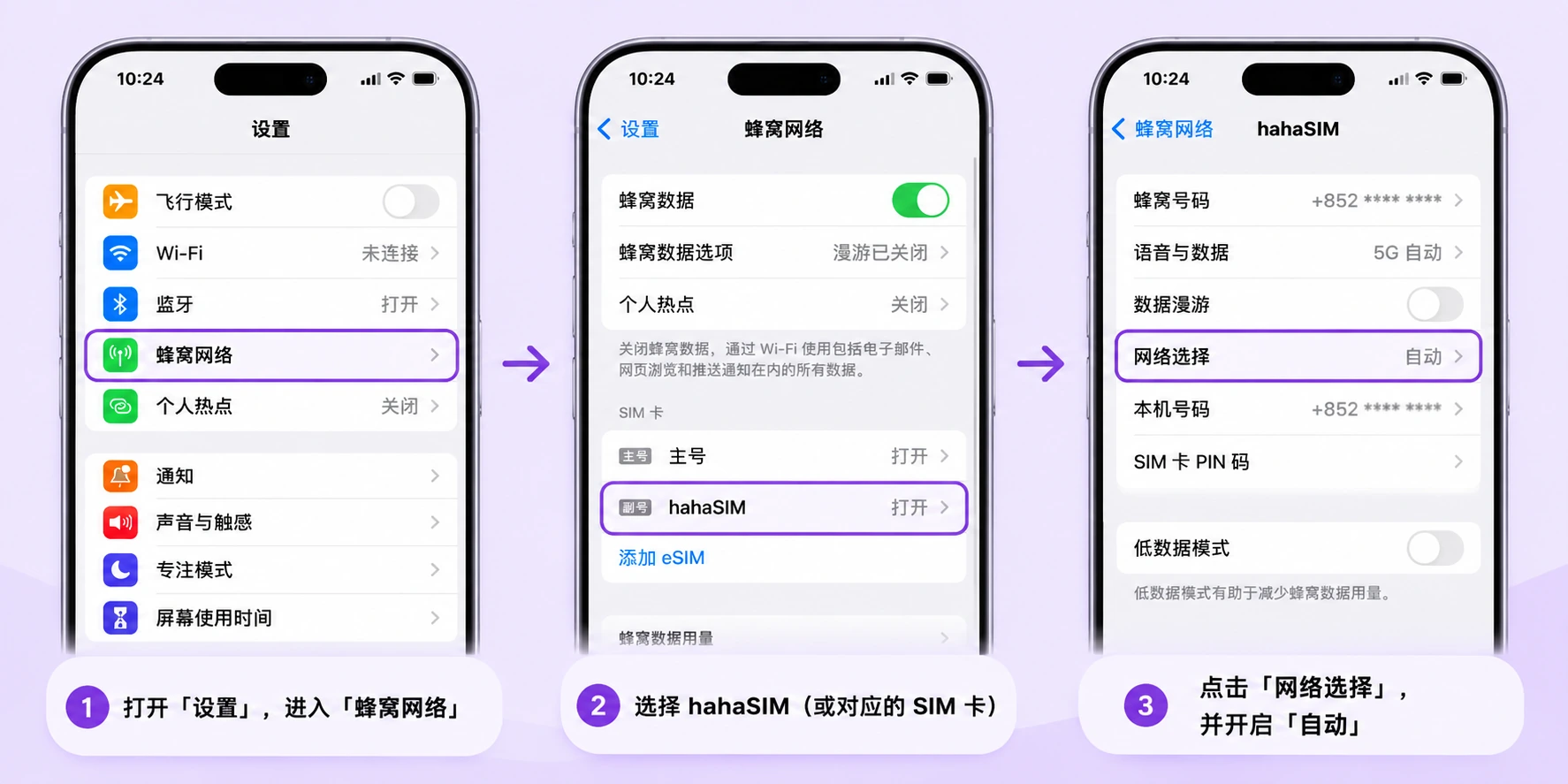
First turn off your phone and pop the hahaSIM out of the card holder. Choose the SIM size your phone takes, then put it in the SIM tray.
On a dual-SIM phone, use the SIM 1 slot if you can. Then:
1. Turn on the phone
2. Make sure the SIM is enabled
3. Set network selection to automatic
4. Turn off Wi-Fi for now
5. Wait for the phone to find and connect to a mobile network
Fortress recommends being off Wi-Fi the first time the SIM starts up.
4. Step 2: get your Hong Kong number
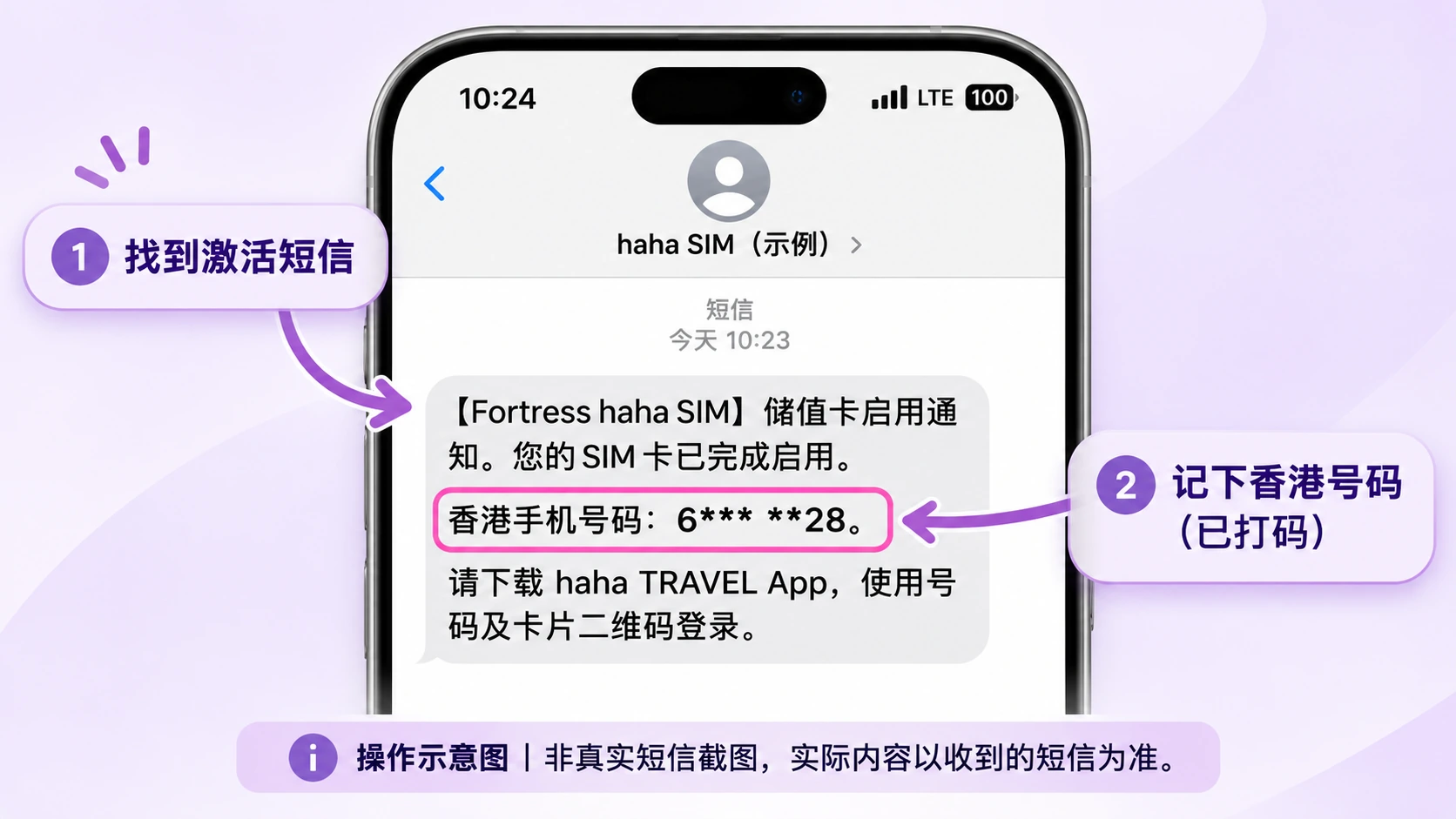
Normally, once the SIM connects to a network for the first time, the system sends an activation text to the phone. It usually says the SIM has been activated and includes the Hong Kong number assigned to you.
Hong Kong mobile numbers are usually 8 digits, with the country code +852. For example: +852 XXXX XXXX
Once the activation text arrives, save the number. You will need it to log in to the app later.
If no activation text arrives, first try restarting the phone or turning airplane mode on and off again, or check network selection. Detailed troubleshooting is at the end of this guide.
5. Step 3: download the haha TRAVEL app
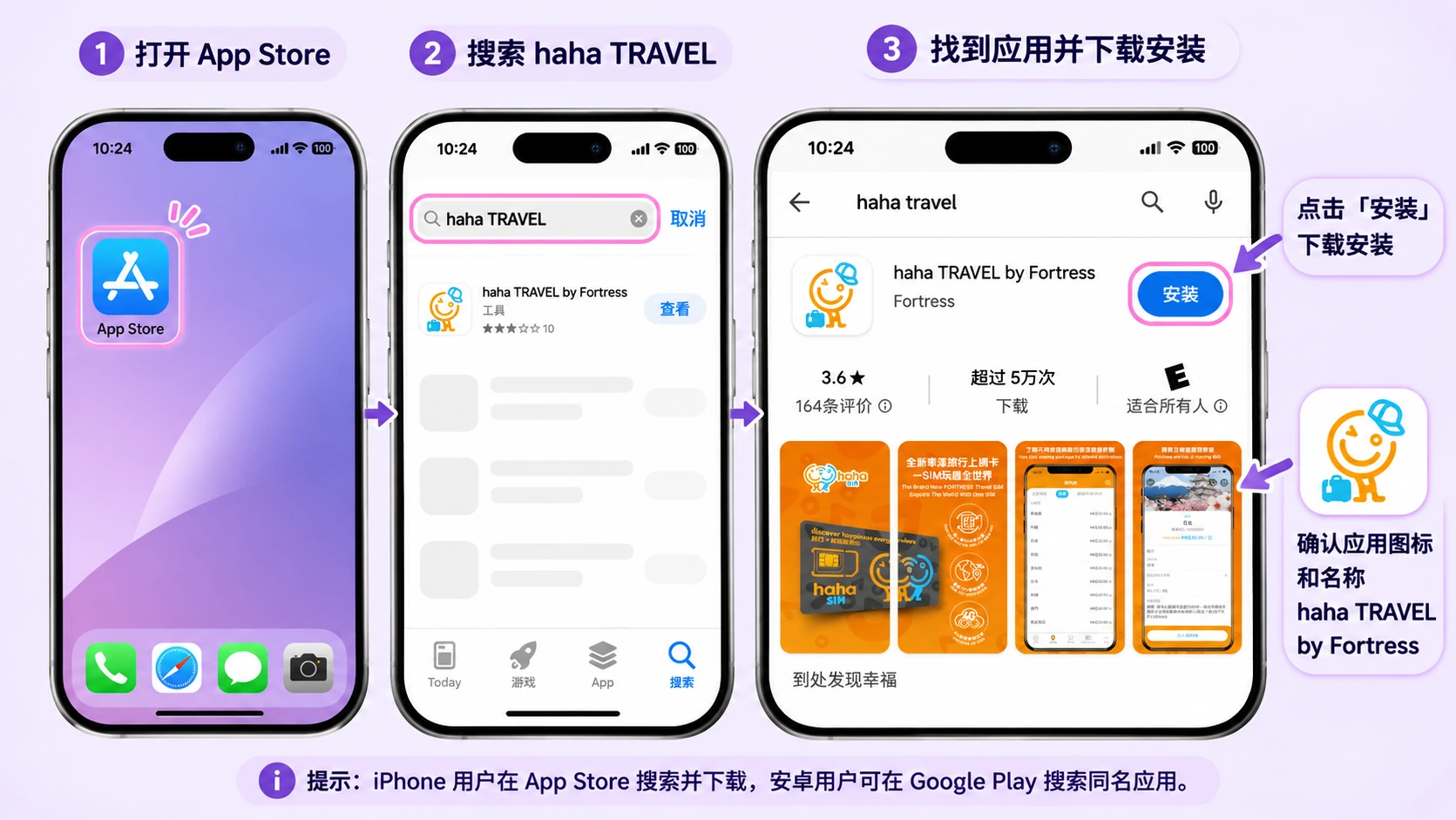
After the SIM finishes its first start-up, the next step is to install the official management app.
App name: haha TRAVEL by Fortress. There are official iPhone and Android versions.
iPhone download:
https://apps.apple.com/hk/app/haha-travel-by-fortress/id1482719988
Android download:
https://play.google.com/store/apps/details?id=com.fortress.sim
You can also search for haha TRAVEL in the app store. Check the developer so you do not download a third-party app with a similar name.
After it is installed, open the app. You can reconnect to Wi-Fi at this point, because logging in to the app needs a network connection.
6. Step 4: bind hahaSIM in the app
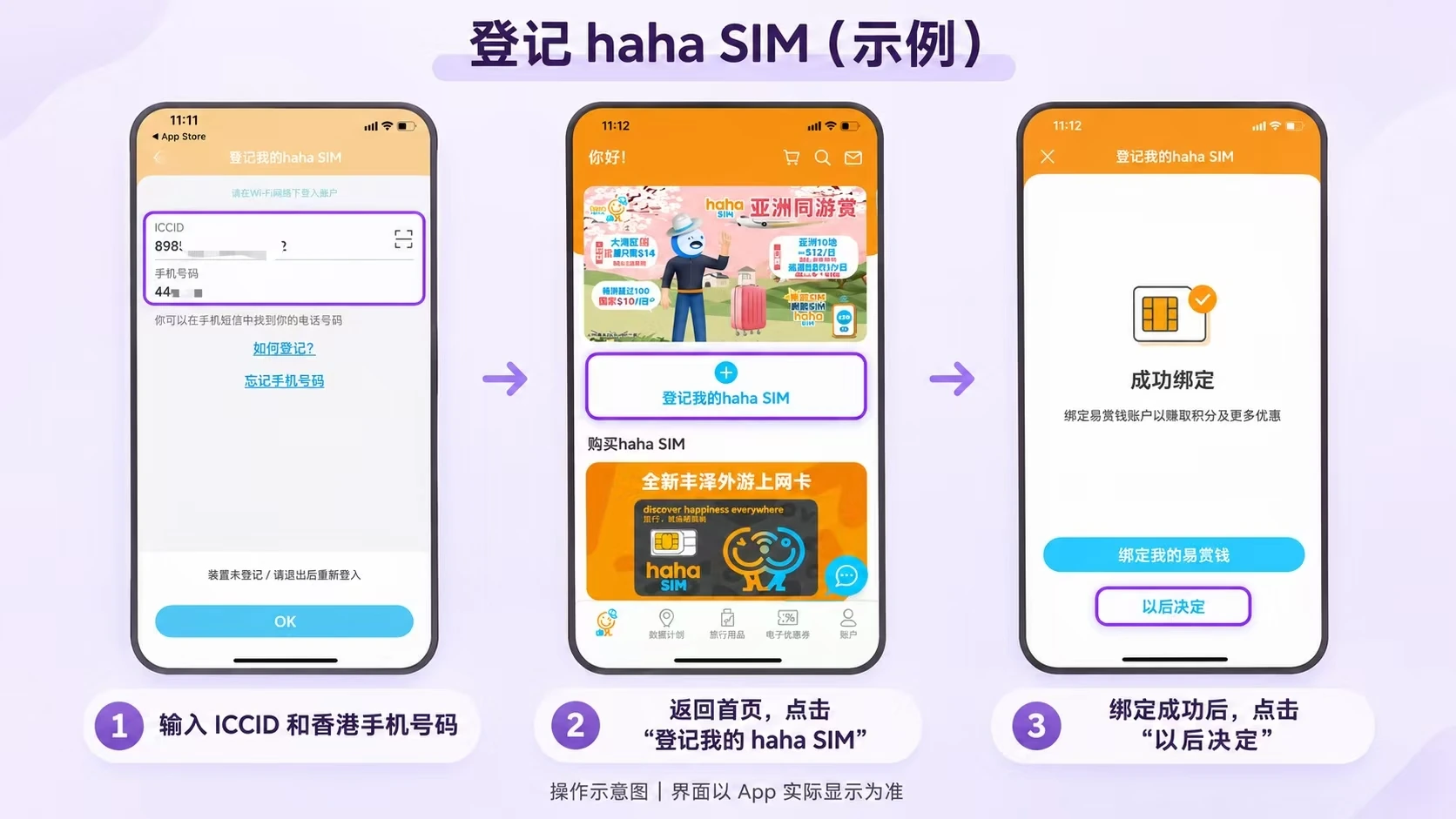
Open the haha TRAVEL app and follow the on-screen prompts to the hahaSIM account login or binding flow.
The first binding needs two pieces of information:
First: your Hong Kong number. Enter the number from the activation text.
Second: the ICCID. You can find it at the barcode below the SIM on the card holder.
The first login uses the 18-digit ICCID on the card's barcode. You can scan the QR code on the card holder in the app, or type the ICCID in as prompted.
When you are done, check that the number and ICCID are correct, then continue. The app then says the binding succeeded and asks whether you want to link a "Yuu" (易赏钱) account. Tap "Decide later" (以后决定) here.
7. Step 5: check the balance, number and expiry date
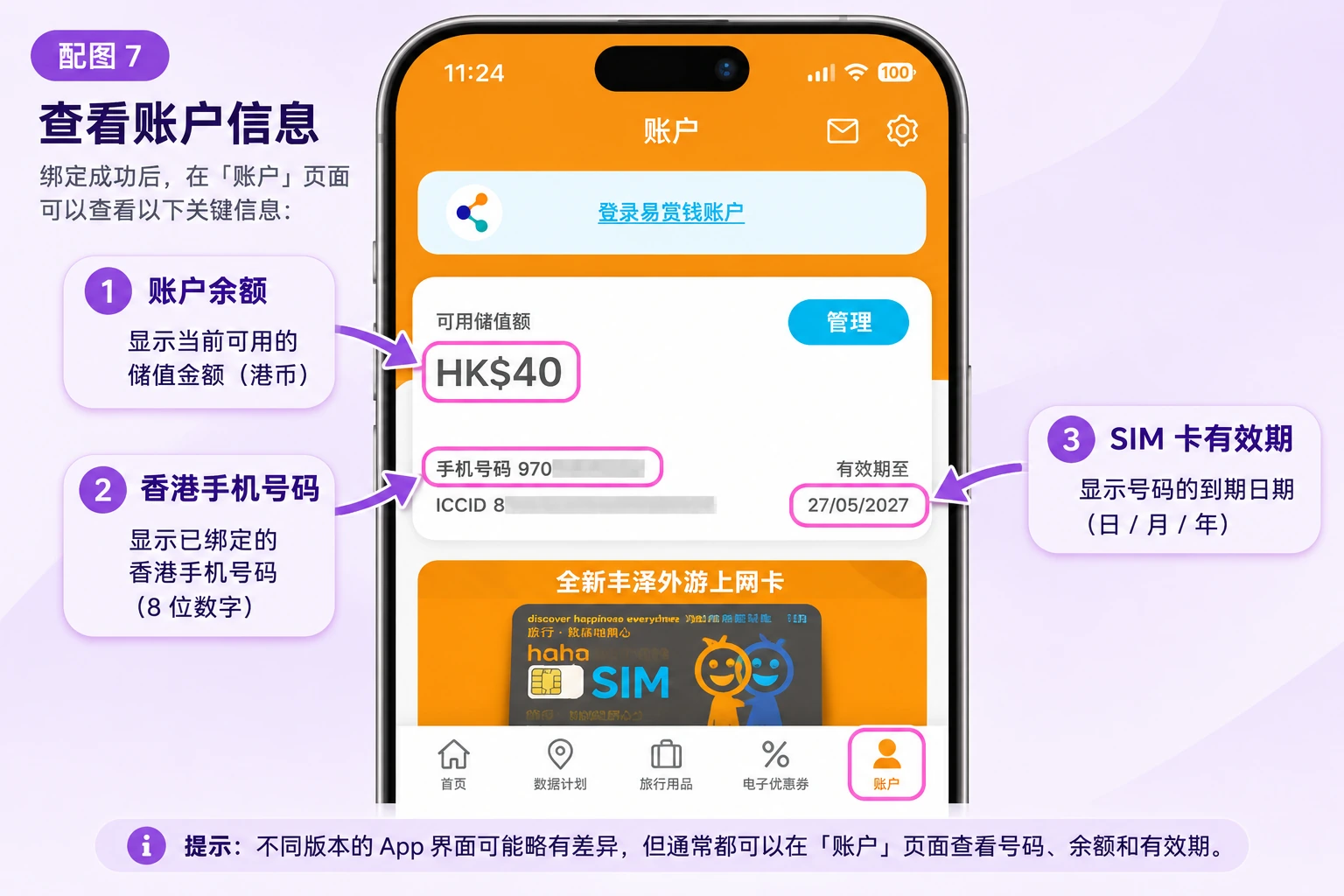
After binding, go to the Account page in haha TRAVEL and check three things:
1. Phone number: make sure the Hong Kong number shown is correct.
2. Account balance: the card comes with HK$50 of stored value.
3. SIM validity: note the expiry date shown in the account. Whenever you need to top up or renew later, you can check it in the app.
That completes the initial hahaSIM activation and app binding. Next, decide whether you need a roaming plan based on how you will use it.
8. Step 6: use hahaSIM in mainland China
Many people buy hahaSIM not for everyday data but to keep a Hong Kong number long term and receive texts. There are two cases here.
Case 1: you only want to receive verification codes
First make sure the SIM is connected to a mobile network, then try receiving an ordinary text. According to several user test reports, receiving texts while roaming in mainland China is usually free, but go by the carrier's current charges.
Note: receiving ordinary texts does not guarantee you will receive codes from every platform.
Whether a code arrives also depends on whether the sending platform supports the number, the carrier's SMS routing and the number's status. If one platform's code never arrives, do not jump to the conclusion that the SIM failed to activate. Test with other texts first, then troubleshoot step by step.
Case 2: you want roaming data in mainland China
To get online with hahaSIM in mainland China, you need a roaming data plan that covers mainland China.
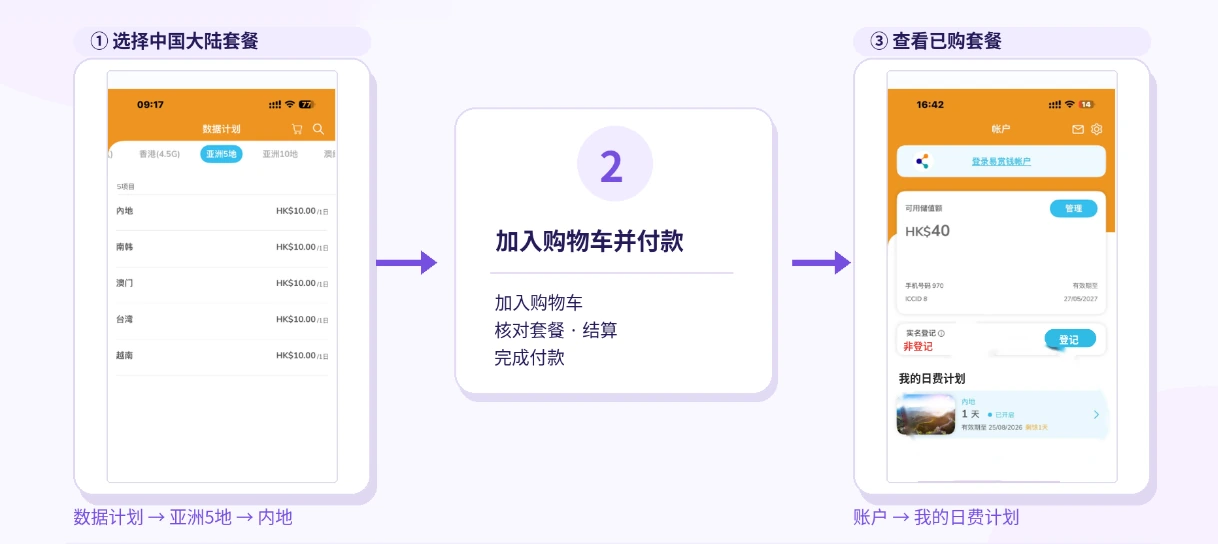
Here is how:
1. Open the haha TRAVEL app.
2. Go to Data Plans (数据计划) and choose Asia 5 (亚洲5地).
3. Find Mainland (内地) and choose a roaming data plan that suits you.
4. Check the price, data allowance and validity, then tap Add to cart (加入购物车).
5. Open the cart, check the plan details, tap Checkout (结算) and pay.
6. After purchase, go to Account → My day plans (我的日费计划) to see the plan you bought.
7. Turn on data roaming on your phone as the plan requires.
9. Does hahaSIM need real-name registration?
This is another common beginner question. According to Fortress's current product notes, using local Hong Kong services requires completing Hong Kong SIM real-name registration.
If you only use roaming outside Hong Kong, such as in mainland China, you generally do not need to complete the real-name process for local Hong Kong services first.
That does not mean the number will never be asked for identity details, because the rules keep changing. If the carrier sends a notice about real-name registration, identity verification or a spot check, follow the official instructions, or the service may be suspended.
If you need to register, you can reach the official registration system through the entry in haha TRAVEL. You may need a Hong Kong ID card or an accepted travel document, and you submit the details as the page asks. Do not hand your ID to unknown third-party registration services.
10. How do you top up hahaSIM and keep the number long term?
hahaSIM suits people who want to keep a Hong Kong number long term. Under Fortress's current official rules:
- check_circleAfter first activation, the SIM is valid for 365 days.
- check_circleA single top-up of at least HK$10 extends the stored-value card's validity by 365 days.
- check_circleBuying a data plan alone does not extend the card's validity.
- check_circleYou need to renew before the current validity ends.
So if you only want to keep the number, check the expiry date ahead of time and top up in the official app before it expires.
Do not assume that buying a data pack renews the number. If the card has already expired, contact official support as soon as possible. Fortress currently lets you apply to reactivate within 14 days of expiry, but success is not guaranteed. After 14 days, you cannot apply to reactivate the number.
11. Common activation problems
1. The phone keeps showing "No Service" after inserting the SIM
Check these in order:
- check_circleWhether the SIM is inserted correctly
- check_circleWhether the phone is carrier locked
- check_circleWhether network selection is set to automatic
- check_circleOn a dual-SIM phone, whether you can try the SIM 1 slot
- check_circleWhether toggling airplane mode makes it search again
- check_circleWhether VoLTE is turned on
If it still will not connect, try searching manually for an available local carrier network, but do not treat any one carrier as the fixed choice for every region.
2. The phone has signal but no activation text arrived
Turn off Wi-Fi first, check that the SIM is connected to a mobile network, then restart the phone.
If the number never arrives, you can also try the Forgot phone number (忘记手机号码) feature in the haha TRAVEL app and follow its steps.
3. The app says the phone number and ICCID do not match
Check these closely:
- check_circleWhether the phone number is entered correctly.
- check_circleWhether you typed the +852 country code twice by mistake.
- check_circleWhether the ICCID comes from the card you are binding now.
- check_circleWhether you mixed up the digit 0 and the letter O.
- check_circleWhether the app is updated to the latest version.
If it still shows an error, check with official support.
4. Activated, but verification codes do not arrive
First check whether ordinary texts arrive. If ordinary texts arrive and only one platform's code does not, it may be the platform's number verification or its SMS sending.
If no ordinary texts arrive at all, check the carrier registration status, account balance, network connection and whether there is any service suspension notice. Some third-party guides say texts started arriving again after buying a mainland China roaming day pass. That is user experience, not a general fix promised by Fortress, so do not treat it as a required step.
5. Signal, but no internet
First make sure you have bought a valid mainland roaming data plan, and check that mobile data and data roaming are on.
The APN Fortress provides is: mobile.lte.three.com.hk
If you need to set it manually, enter it on your phone's APN settings page.
After setting it, reconnect to the network or restart the phone.
6. Why can't I sign up for some apps?
A Hong Kong number will not necessarily pass sign-up verification on every platform. Some platforms may restrict numbers from certain regions, or reject sign-ups because of recycled numbers, earlier registrations on the number, or their own risk controls.
So do not count on hahaSIM as a sure way to register on a platform whose support for it you have not checked.
12. Summary: hahaSIM activation for beginners
The whole process is not complicated:
Insert the SIM → wait for the activation text → get your Hong Kong number → download haha TRAVEL → scan or enter the ICCID → bind the account → check the expiry date → buy a roaming plan if needed.
The first time, keep three pieces of information:
- check_circleYour Hong Kong number
- check_circleThe SIM's ICCID
- check_circleThe number's expiry date
These matter for logging in later, managing the account and keeping the number long term.
If you only need a backup Hong Kong number, finish activation and a text test first, then decide whether you need an extra data plan.
One last reminder: roaming rates, plan prices, real-name requirements and the app interface can all change. Go by the latest information from Fortress and haha TRAVEL.